No affiliate links or sponsorship, and BravoTech isn’t affiliated with Vocaroo. This Vocaroo review is editorial: it’s based on Vocaroo’s own FAQ, privacy, About, and Schools pages, plus screenshots of vocaroo.com we captured on October 13, 2026. We didn’t make, share, or delete test recordings. More in our app and software reviews.
Quick answer
Vocaroo is a free website for recording and sharing voice messages: you record or upload audio in your browser and get a short link to send, with no account needed. Vocaroo says recordings are usually kept for at least 12 months, and anyone with the link can listen, so it’s great for quick voice notes and wrong for private audio. Our editorial score is 7.0/10.
Key takeaways
- How long recordings last: “usually kept for a minimum of 12 months,” per Vocaroo’s FAQ, with no guarantee of permanent storage. Download anything you need to keep.
- Privacy: Vocaroo’s own policy says it “should not be used for highly private or confidential audio.” The link is the only lock.
- Deleting: the delete button only shows in the browser that made the recording, and it can vanish if you clear cookies or history.
- Length: the maximum recording time is “somewhere over 6 hours,” according to Vocaroo.
Our verdict
Editorial score: 7.0/10
Verdict: Vocaroo scores 7.0 out of 10
Vocaroo does one job well: it turns a voice message into a link in a couple of clicks, with nothing to install and no sign-up. Its footer dates the service to 2007, its help pages are short and candid, and it tells you plainly what it isn’t for. It loses points on control. Anyone with the link can listen, deletion depends on your browser’s cookies, and storage time isn’t guaranteed.
Who it suits: students, teachers, tutors, and anyone sending a quick spoken note or pronunciation sample. Who should skip it: anyone recording client calls, medical or legal details, or audio that has to be kept for years.
Fact sheet · checked October 13, 2026
- What it is: Free online voice recorder and audio-sharing site
- Official site: vocaroo.com (share links use the voca.ro short domain)
- Price: No prices or paid plans found; the site asks for optional donations
- Account: Not required; Vocaroo says it’s “fully usable without any account or login”
- Max recording length: “Somewhere over 6 hours” (FAQ)
- Retention: Usually at least 12 months; not guaranteed
- Data storage: Cloud providers in the European Union (privacy policy)
- Best for: Quick, non-sensitive voice messages
What is Vocaroo?
Vocaroo is a browser-based voice recorder that bills itself as “the premier voice recording service.” You press a big red microphone button, speak, and save the clip to get a short link you can paste into a message or email. There’s also an upload page for audio files you’ve already recorded. The footer dates the service to 2007, and its About page says it “strives to collect as little user data as necessary.”
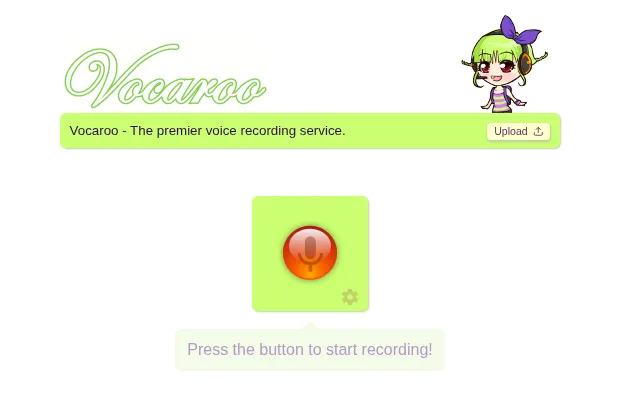
The site is refreshingly blunt about its limits. The same About page warns that “accidents may and do happen, and messages may get lost or corrupted. So please don’t use this service for anything too important.” Keep that line in mind for the rest of this guide.
Is there a Vocaroo app?
We found no official app linked from vocaroo.com. Vocaroo runs in the browser on desktop and phone. On an iPhone, its FAQ notes that every browser uses Safari’s engine under the hood, so switching from Chrome to Safari won’t change how recording behaves.
How to use Vocaroo
Using Vocaroo takes about as long as the message itself. Here’s the flow as the site presents it. We viewed the recorder and upload screens but didn’t save a recording, so the sharing options below come from the labels in Vocaroo’s own interface.
- Open vocaroo.com. Type the address yourself rather than clicking an ad or a look-alike result.
- Click the red microphone. Your browser will ask for microphone access. Allow it for vocaroo.com only.
- Speak, then stop. Play the clip back before you save it.
- Save and share. Vocaroo’s interface labels list a share link, a QR code, an embed option for websites or blogs, and a download button.
- Download a copy of anything you need to keep. Don’t rely on the link alone.
What do the recorder settings do?
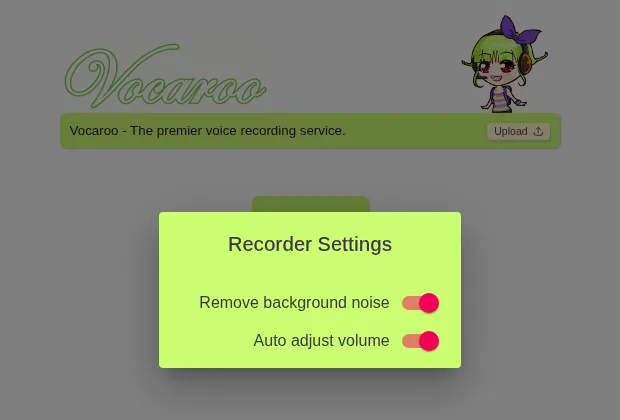
The small gear icon under the microphone opens Recorder Settings with two switches: Remove background noise and Auto adjust volume. Both were switched on when we opened the panel. Vocaroo doesn’t document what they do in detail, so if a recording sounds off, try it with the filters switched off.
How do you upload an audio file to Vocaroo?
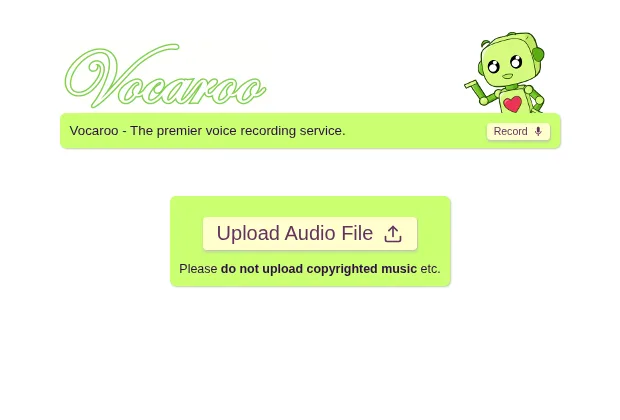
Click Upload in the green bar at the top, then Upload Audio File. The page asks you not to upload copyrighted music. Vocaroo’s interface includes a “File is too big!” message, so there is a size limit, but the site doesn’t publish the number or a list of supported formats. If an upload fails, try a smaller file.
How do you delete a Vocaroo recording?
Open the recording in the same browser you made it in and use the delete button underneath it. Vocaroo’s FAQ warns that the button “may disappear if you clear your web browser cookies or history.” If it’s gone, its Schools page says you can email a deletion request for a specific recording to [email protected]. Lost a link? The FAQ points to an experimental history page that only works in the original browser.
How long do Vocaroo recordings last?
At least a year, usually, but nothing is promised. Vocaroo’s FAQ says: “Audio is usually kept for a minimum of 12 months, and regularly accessed audio will be kept for even longer, perhaps indefinitely.” It adds that “there is not yet an option to guarantee permanent storage.”
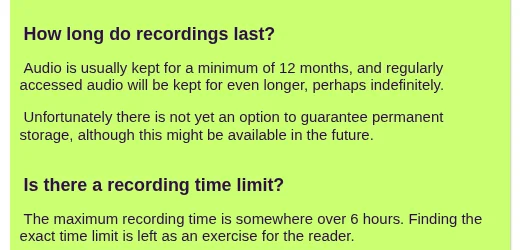
Vocaroo’s other pages are vaguer. The privacy policy says recordings “may automatically expire and be removed if they are accessed infrequently,” and the Schools page says unaccessed recordings are deleted “for a period of some months.” Vocaroo’s homepage, upload, and privacy pages also link to a February 21 owner post on Ko-fi, “No Ads, What Now?”, described as “a note on audio expiry times.” We couldn’t load the full post, so we can’t tell you what it changes. The practical advice doesn’t depend on it: if a recording matters, download the MP3 and store it yourself.
Is Vocaroo safe and private?
Vocaroo is safe for everyday voice notes, as long as you treat every link as public. We found nothing on its official pages suggesting otherwise, and the site needs no account, so there’s no password to leak. The risk is about who ends up with the link.
Who can hear your Vocaroo recording?
Anyone who has the link. Vocaroo’s privacy policy is direct: it “is designed for the easy sharing of audio files with others, and so should not be used for highly private or confidential audio.” It adds that short, shareable links “do not provide the highest degrees of security required for confidential purposes.” Vocaroo’s pages don’t describe any password protection or listener controls, so a forwarded link should be treated as working for whoever receives it.
What does Vocaroo store about you?
According to the privacy policy (last updated June 30, 2021), Vocaroo may log your IP address and browser details for debugging, deletes those logs within two weeks, and stores data with cloud providers in the European Union. It collects an email address or phone number only if you join the mailing list or create an optional account. Its cookie section says cookies store things like recorder settings and account data such as a list of recordings, and the FAQ warns that clearing cookies or history can remove the delete button.
Does Vocaroo have ads?
Vocaroo’s pages disagree, so check for yourself. The privacy policy says the site “makes use of Google Ads,” and the Schools page says it is “supported entirely by Google Ads which are shown on media playback pages.” Newer pages carry a “No Ads, What Now?” link and a donation banner, and we saw no ad slots on the homepage, upload, or FAQ pages we captured. Either way, be wary of anything on a playback page that asks you to install software. For a refresher on what to watch for, see our guide to malware vs. viruses.
Don’t use Vocaroo for
- Confidential work audio: client calls, HR matters, or anything under an NDA.
- Medical, legal, or financial details: account numbers, diagnoses, or case notes.
- Recordings of other people who haven’t agreed to be shared by link.
- Your only copy of something important. Download it first.
For private recordings, keep the file in your own cloud storage and share it only with named people. Our pCloud review and Dropbox vs Google Drive comparison cover options with real sharing controls.
Is Vocaroo OK for schools?
Vocaroo has a page for schools. That page says Vocaroo has no login or user profiles, so it can’t know whether a user is a child, and that it collects as little information as possible from everyone. It suggests network admins block pagead2.googlesyndication.com for an ad-free experience. Schools should still check their own student-privacy rules before assigning it.
How we checked and scored this Vocaroo review
How we score
This is an editorial review built from published facts, not a lab test. On October 13, 2026 (PKT), we read Vocaroo’s FAQ, privacy, About, and Schools pages and captured its recorder, settings, upload, and FAQ screens in headless Chrome from a non-US server. We didn’t record, upload, share, or delete audio, so we make no claims about sound quality, upload speed, or reliability.
Scoring. Five criteria, each rated out of 10 from published information: ease of use (25%), privacy and sharing controls (25%), storage reliability (20%), features (15%), and transparency (15%).
| Criterion | Weight | Score | Why |
|---|---|---|---|
| Ease of use | 25% | 9/10 | One button, no account, works in any modern browser |
| Privacy and sharing controls | 25% | 5/10 | Minimal data collected, but no passwords or listener controls; delete depends on cookies |
| Storage reliability | 20% | 6/10 | Usually 12+ months, no guarantee; the site itself warns messages can get lost |
| Features | 15% | 7/10 | Link, QR code, embed, download, upload, noise and volume filters; no editing tools described |
| Transparency | 15% | 8/10 | Plain-English FAQ and privacy pages, though the ad wording conflicts with the No Ads link |
| Weighted total | 100% | 7.0/10 | Editorial rating |
Vocaroo pros and cons
Pros
What works in its favor: It’s free, needs no account, and works in a browser on any device. Sharing options cover links, QR codes, embeds, and downloads, and recordings can run for hours. Its policies are short and readable.
Cons
The catch: Anyone with the link can listen. Deleting only works from the original browser, storage time isn’t guaranteed, and Vocaroo describes no editing tools. Its pages give mixed signals about ads.
What are the best Vocaroo alternatives?
It depends on what you need that Vocaroo doesn’t do. SpeakPipe offers a similar free browser recorder that can save a recording and give you a link. For privacy, record on your device and share the file through cloud storage you control.
| Need | Option | Why |
|---|---|---|
| Same quick link, no install | SpeakPipe voice recorder | Records in the browser, can save to SpeakPipe’s server and give you a link; works on iPhone, iPad, and Android, per SpeakPipe |
| Record on iPhone, keep it private | Voice Memos (Apple) | Built-in app; recordings stay on your device or sync through your iCloud account |
| Share with named people only | Cloud storage | Share a file only with the people you choose |
If you’re editing recorded audio for video, see Final Cut vs Premiere Pro.
FAQ
How long do Vocaroo recordings last?
Vocaroo’s FAQ says audio is “usually kept for a minimum of 12 months,” and recordings that are played often may stay up much longer. There’s no option to guarantee permanent storage, and the privacy policy says rarely accessed recordings may expire. Download an MP3 of anything you need to keep.
Is Vocaroo safe to use?
For everyday voice notes, yes. It needs no account, and its privacy policy says it collects little data. But anyone with a recording’s link can listen, and Vocaroo itself says it shouldn’t be used for highly private or confidential audio. Treat every Vocaroo link as if it could be forwarded.
Can I delete a Vocaroo recording?
Yes, from the same browser you recorded it in, using the delete button under the recording. Vocaroo warns that the button may disappear if you clear your cookies or browsing history. If that happens, you can email [email protected] to ask for a specific recording to be removed.
How long can a Vocaroo recording be?
Vocaroo’s FAQ puts the maximum recording time at “somewhere over 6 hours” and doesn’t give an exact figure. For long lectures or meetings, a recorder app on your own device keeps the file locally from the start.
Does Vocaroo work on iPhone?
Yes, in the browser. There’s no official app linked from vocaroo.com. Vocaroo’s FAQ notes that all iPhone browsers use Safari’s engine, so recording behaves the same in Chrome or Safari. You’ll need to allow microphone access when your browser asks.
Do I need an account to use Vocaroo?
No. Vocaroo’s About page says the site is “fully usable without any account or login.” Its privacy policy mentions an optional account and a mailing list, which are the only times it asks for an email address or phone number.
Is Vocaroo free?
As far as we can tell, yes. We found no prices or paid plans on vocaroo.com, and its About page says it’s usable without an account. The site shows a banner asking for optional monthly donations through Ko-fi.
What is a good alternative to Vocaroo for private recordings?
Record on your own device, for example with Voice Memos on an iPhone, then share the file through cloud storage that lets you choose exactly who can open it. That way you control access and deletion instead of relying on a public link.
Sources
Every fact in this review is linked to its source. All pages were checked on October 13, 2026 (PKT).
Show all 9 sources
- Vocaroo: Frequently Asked Questions (retention, time limit, delete, iOS browsers, screenshots)
- Vocaroo: Privacy Policy and GDPR information (last updated June 30, 2021)
- Vocaroo: About (disclaimer, no-account use)
- Vocaroo: Information for schools (ads, deletion requests, FERPA/COPPA note)
- Vocaroo: recording history page (experimental)
- Vocaroo on Ko-fi: “No Ads, What Now?” owner post (February 21, 2026; full text not readable by us)
- SpeakPipe: Free voice recorder
- Apple iPhone User Guide: Make a recording in Voice Memos
- BravoTech headless-Chrome captures of vocaroo.com’s recorder, recorder settings, upload page, and FAQ (October 13, 2026). No audio was recorded, uploaded, or shared.
Changelog
- October 13, 2026 (fact check): Re-checked every claim against Vocaroo’s FAQ, privacy, About, Schools and upload pages and SpeakPipe’s recorder page. Softened claims about share options, pricing, missing features and the owner’s Ko-fi note to what those pages support, and removed an unsupported line about teachers and a Discord link.
- October 13, 2026: Fully rewritten. Replaced the “expires after a few months” claim with Vocaroo’s “minimum of 12 months” FAQ wording, removed the Discord-for-privacy advice and the “I tested” framing, and added Vocaroo’s own privacy warning, delete-button limits, the ads question, real vocaroo.com screenshots, alternatives, an editorial score, and dated sources. No hands-on recording tests were done.
- May 28, 2026: First published.
Related reads