No affiliate links or sponsorship. Plan names, US list prices, storage quotas, file-size limits and sync features come from Dropbox and Microsoft’s own pages, re-checked November 6, 2026. We did not run hands-on sync, upload or restore tests, and there are no screenshots. Our editorial policy explains how we use AI and check facts.
Quick answer
Dropbox vs OneDrive is mainly a storage-vs-apps trade-off. Choose Microsoft OneDrive (via Microsoft 365) if you want Word, Excel and PowerPoint desktop apps with your cloud space. Choose Dropbox if you need more space per dollar for one person, larger single-file uploads, or a storage product that isn’t tied to Office. On US list prices checked November 6, 2026, Microsoft 365 Personal is $99.99 a year for 1 TB plus the desktop apps; Dropbox Plus is listed at $9.99 a month for 2 TB of storage alone.
Key takeaways
- Free tier: Dropbox Basic starts at 2 GB; a Microsoft account includes 5 GB of OneDrive cloud storage.
- One person, paid: Dropbox Plus lists 2 TB at $9.99/month; Microsoft 365 Personal lists 1 TB at $99.99/year (or $9.99/month) with desktop Office apps.
- Households: Microsoft 365 Family is $129.99/year for up to six people, with 2 TB shared for new subscriptions started on or after October 8, 2026; Dropbox Family shares 2 TB among up to six people (confirm current Family price at checkout).
- Big files: Dropbox allows uploads up to 2 TB per file (desktop app); OneDrive caps uploads and sync at 250 GB per file.
- Sync space-savers: both offer online-only / Files On-Demand style placeholders so cloud files don’t fill the hard drive.
- No score pills: this page uses decision and plan tables from official docs, not hands-on test scores.
How we compared
We compared the consumer plans using Dropbox and Microsoft’s official plan, help and storage-quota pages, all re-checked November 6, 2026 (PKT), with US list prices. Microsoft’s compare-plans marketing page was opened via WebFetch the same day (direct automated fetches were blocked). We did not run speed, reliability or restore tests. Where a detail isn’t documented, we leave it out. There are no numeric score pills.
Who should pick Dropbox or OneDrive?
Start with how you work, not with brand loyalty. New to cloud storage? Our cloud storage guide covers the basics. For OneDrive itself, see What Is OneDrive?. We also compared each service with Google Drive in Dropbox vs Google Drive and OneDrive vs Google Drive.
| If you… | Lean toward | Why (from official plans) |
|---|---|---|
| Need desktop Word, Excel, PowerPoint with your storage | OneDrive + Microsoft 365 Personal or Family | Personal and Family include those desktop apps with OneDrive storage on Microsoft’s plans page |
| Want the most listed storage for one person at the common ~$10/month price point | Dropbox Plus | Plus lists 2 TB at $9.99/month; Personal lists 1 TB at $9.99/month (or $99.99/year) |
| Share with up to six people and want Office for the household | Microsoft 365 Family | $129.99/year; up to six people; new Family subs from Oct 8, 2026 get 2 TB shared storage |
| Need to upload or sync single files larger than 250 GB | Dropbox | Dropbox max file size is 2 TB; OneDrive upload/sync limit is 250 GB per file |
| Only need a little more space cheaply | Microsoft 365 Basic | 100 GB for $19.99/year (or $1.99/month); Dropbox’s free Basic is 2 GB |
| Already live in Windows Backup / Microsoft account photos | OneDrive | Microsoft 365 plans advertise Windows backup and camera-roll backup among OneDrive features |
| Want a storage-first product with Transfer, PDF tools and Replay on higher plans | Dropbox | Plus and team plans list Transfer sizes, PDF editing and Replay on Dropbox’s plan table |
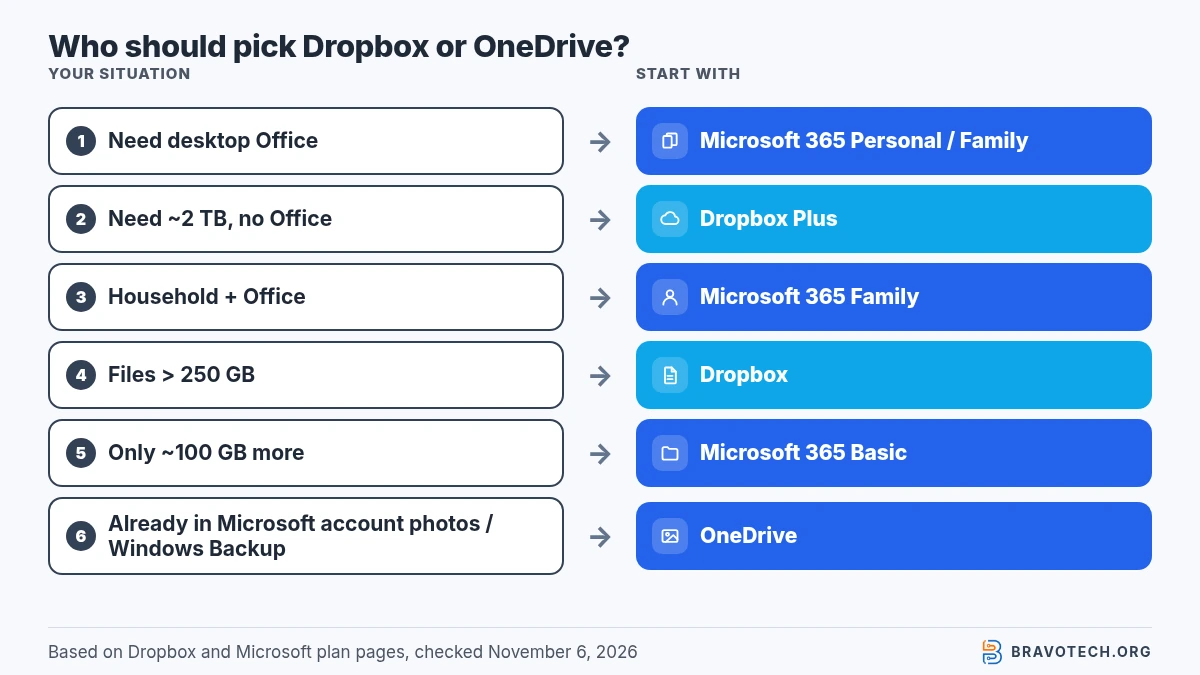
- Pick OneDrive if the Microsoft 365 apps are worth more to you than raw terabytes.
- Pick Dropbox if you mainly need reliable file sync and more space without buying Office.
- Compare both with Google Drive if Gmail and Docs are your daily suite — see the sibling comparisons linked above.
Dropbox vs OneDrive at a glance
Both sync files across computers and phones; they differ on free space, paid tiers, bundled apps and per-file limits. Prices below are US list prices from each company’s pages on November 6, 2026.
| Dropbox | OneDrive (Microsoft 365) | |
|---|---|---|
| Free storage | Basic: 2 GB | 5 GB cloud storage per Microsoft account |
| Entry paid plan | Plus: 2 TB, $9.99/month | Basic: 100 GB, $1.99/month or $19.99/year |
| 1 TB-class plan | No separate 1 TB consumer tier on the main plans table; Plus jumps to 2 TB | Personal: 1 TB, $99.99/year or $9.99/month, includes desktop Office apps |
| Family / household | Family: up to 6 people, 2 TB shared (confirm price at checkout) | Family: up to 6 people, $129.99/year or $12.99/month; 2 TB shared for new subs from Oct 8, 2026 |
| Max file size | Up to 2 TB per file (desktop app; browser large uploads may fail above ~375 GB) | 250 GB per file (upload and sync) |
| Online-only / on-demand files | Yes (online-only + selective sync) | Yes (Files On-Demand) |
| Version / deleted-file window (personal paid) | Plus: 30-day history | Personal accounts: Microsoft documents 30-day version history and recycle windows; Microsoft 365 can restore OneDrive |
US plans and storage compared
Dropbox sells storage-first plans; Microsoft sells Microsoft 365 subscriptions that include OneDrive storage. Figures below are US list prices from Dropbox’s plans page, Dropbox’s buy comparison, Microsoft’s OneDrive plan comparison and Microsoft storage quotas, checked November 6, 2026.
Dropbox consumer and team list prices
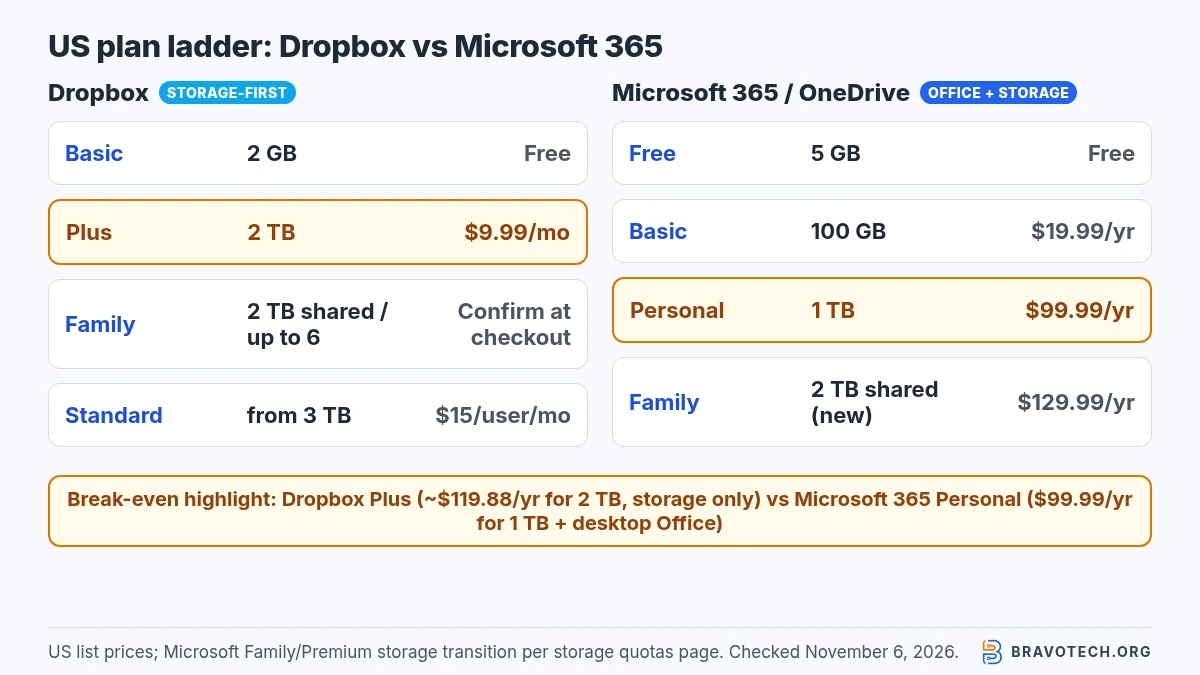
| Plan | US list price | Storage | Users / notes |
|---|---|---|---|
| Basic (free) | Free | 2 GB starting storage | Earn more via referrals (Dropbox Help) |
| Plus | $9.99 / month | 2 TB (2,000 GB) | 1 person; 30-day version/restore history; Transfer up to 50 GB |
| Family | Confirm at checkout (product page lists features, not a fixed price in our fetch) | 2 TB shared | Up to 6 members; Family Room folder |
| Standard | $15 / user / month | Starts at 3 TB for the team | 1 person or more; 180-day history; Transfer up to 100 GB |
| Advanced | $24 / user / month | Starts at 15 TB for the team | 3 people or more; 1-year history |
| Professional | Not a primary US web checkout plan | 3 TB | Help (Jul 21, 2026): buy via mobile app stores; dropbox.com purchase limited to Brazil and Japan; Dropbox points people to Standard |
Availability note
Dropbox Professional availability. Dropbox Help says Professional can be bought through a mobile app store, and that on dropbox.com it can now only be purchased in Brazil and Japan. For advanced individual features elsewhere, Dropbox points readers to Standard (no minimum user count). We don’t treat Professional as a default US recommendation.
Microsoft 365 / OneDrive US list prices
| Plan | US list price | Cloud storage | Users / notes |
|---|---|---|---|
| Microsoft account (no subscription) | Free | 5 GB | Separate 15 GB Outlook.com mailbox storage |
| Microsoft 365 Basic | $19.99 / year or $1.99 / month | 100 GB | 1 person; ransomware protection listed |
| Microsoft 365 Personal | $99.99 / year or $9.99 / month | 1 TB | 1 person; desktop Word, Excel, PowerPoint, Outlook, OneNote; up to 5 devices at once |
| Microsoft 365 Family | $129.99 / year or $12.99 / month | 2 TB shared for new subscriptions starting Oct 8, 2026 (see note) | 1 to 6 people; AI features for subscription owner only |
| Microsoft 365 Premium | $199.99 / year or $19.99 / month | 2 TB shared for new subscriptions starting Oct 8, 2026 (quotas page) | Up to 6 people; higher Copilot usage on Microsoft’s plans page |
Storage transition
Family / Premium storage is changing. Microsoft’s storage quotas page says subscriptions started before October 8, 2026 keep 1 TB per person (up to six people) until renewal, and that new Family and Premium subscriptions from October 8, 2026 — and renewals from May 2, 2027 — get 2 TB of shared cloud storage. Personal stays at 1 TB. Personal, Family, Premium and Pro can extend storage up to 10 TB. Always check your account dashboard for the quota you actually have.
For a wider price grid across vendors, use our cloud storage pricing tracker. Free-tier shopping belongs on best free cloud storage; paid shortlists on best cloud storage. A longer look at Dropbox alone is in our Dropbox review.
When Microsoft 365 beats Dropbox on value
Microsoft 365 usually wins when you need desktop Office; Dropbox Plus usually wins when you only need more than 1 TB without Office. Personal is $99.99 a year for 1 TB plus Word, Excel, PowerPoint, Outlook and OneNote. Dropbox Plus lists 2 TB at $9.99 a month with no desktop Office bundle. Buy Office anyway? Personal or Family. Need 2 TB and already have editors? Plus.
Simple break-even arithmetic from those list prices (taxes excluded; not a promotional offer):
| Situation | Cheaper documented pick | Rough yearly math (US list) |
|---|---|---|
| One person who needs desktop Office + ~1 TB | Microsoft 365 Personal | $99.99/year vs Dropbox Plus ≈ $9.99 × 12 = $119.88/year for storage only |
| One person who needs ~2 TB and already has editors | Dropbox Plus | 2 TB listed on Plus; Personal is 1 TB unless you buy more OneDrive storage |
| Up to six people who need Office | Microsoft 365 Family | $129.99/year for up to six + shared OneDrive storage on the new Family rules |
| Only ~100 GB more space | Microsoft 365 Basic | $19.99/year for 100 GB vs jumping to Dropbox Plus for 2 TB |
| Files larger than 250 GB | Dropbox (capability) | OneDrive’s documented per-file limit is 250 GB; Dropbox allows up to 2 TB per file |
Running out of OneDrive space? Our guide to fixing a full OneDrive covers what Microsoft says happens when you go over quota (that URL may still be scheduled when this draft goes live).
Sync and Files On-Demand
Both can show cloud files on your PC or Mac without downloading every byte. Dropbox calls these online-only files (and also offers selective sync). OneDrive’s equivalent is Files On-Demand. In both cases, opening an online-only file downloads it so you need enough free disk space for that file (Dropbox Help, Microsoft Support).
| Feature | Dropbox | OneDrive |
|---|---|---|
| Online-only / on-demand placeholders | Yes — Make online-only; default sync preference can be Online-only | Yes — Files On-Demand |
| Selective sync (hide folders from the desktop app) | Yes | Yes — choose which folders to sync |
| Platforms cited on plan / help pages | Windows, Mac, iOS, Android, web | PC, Mac, iPhone, iPad, Android, web (Microsoft 365 plans) |
| System notes for online-only | Windows 7+; macOS 10.12+ | See Microsoft’s Files On-Demand and system-requirements pages |
Neither product is a substitute for a separate backup. Synced deletes propagate; recovery depends on each service’s version and recycle windows. See also OneDrive Files On-Demand for the Microsoft-side walkthrough.
File size and sync limits
Dropbox accepts much larger single files than OneDrive. Dropbox’s maximum upload size is 2 TB per file, and it warns that browser uploads larger than about 375 GB may time out — use the desktop app for huge files (Dropbox Help). OneDrive’s documented maximum for upload and sync is 250 GB per file (Microsoft Support).
- Dropbox: every file must also fit in your remaining storage quota; syncing stops if you are over the limit.
- OneDrive: Microsoft recommends keeping total synced items at or below about 300,000 for best performance outside a public preview that raises the ceiling toward 1,000,000 items on qualifying devices.
- Practical takeaway: everyday documents fit either service; large video or disk images are where Dropbox’s higher per-file cap matters.
Version history and recovery
Paid Dropbox plans publish clear day-count windows; Microsoft documents 30-day personal version history and a full OneDrive restore for Microsoft 365 subscribers.
| Capability | Dropbox (from plan table / Help) | OneDrive (from Microsoft Support) |
|---|---|---|
| Deleted / version history on Plus-class personal | Plus: 30-day account recovery and version history | File version history retained for 30 days (personal documentation) |
| Longer history on higher Dropbox tiers | Standard: 180 days; Advanced: 1 year | Work/school recycle windows can differ (admins) |
| Whole-account rewind | Dropbox Rewind listed on Plus Help | Restore your OneDrive for Microsoft 365 subscribers (last 30 days) |
Sync isn’t backup
Sync is not backup. If ransomware or a bad sync deletes files everywhere, you depend on these recovery windows — or a separate backup copy outside the sync folder.
Sharing and security (docs only)
Both encrypt data in transit and at rest according to their security pages. Microsoft says OneDrive uses TLS in transit and unique AES-256 keys at rest per file (Microsoft Support). Dropbox’s plan comparison lists 256-bit AES and SSL/TLS encryption among core features (Dropbox plans).
Higher Dropbox tiers add controls such as password-protected links, watermarking and longer history on the plan table. Microsoft 365 plans list Personal Vault, ransomware detection and password-protected or expiring links among OneDrive features on the compare-plans page. We are not ranking which is “more secure” without an audit — pick the controls your threat model needs.
FAQ
Is Dropbox or OneDrive better value?
It depends what you buy with the money. If you need desktop Office apps, Microsoft 365 Personal ($99.99/year, 1 TB) or Family ($129.99/year) usually delivers more for the price. If you only need storage, Dropbox Plus lists 2 TB at $9.99/month, which is more space than Personal’s 1 TB at the same monthly list price.
Is Dropbox or OneDrive better for Windows?
OneDrive is built into Windows sign-in and Microsoft 365. Dropbox also has a full Windows desktop app with online-only files. Choose OneDrive if you want Office and Windows Backup features from Microsoft’s plans; choose Dropbox if you want a separate storage product.
Which has more free storage?
OneDrive: 5 GB with a Microsoft account. Dropbox Basic: 2 GB starting storage (referrals can add more per Dropbox Help). Google Drive is a different comparison — see our free cloud storage guide.
Can I use Dropbox and OneDrive together?
Yes. Many people keep Office documents in OneDrive and large media or client Transfer folders in Dropbox. Just avoid nesting one sync folder inside the other, which both vendors warn against in various sync docs.
Does Dropbox Professional still exist?
Yes, but Dropbox Help (updated July 21, 2026) says it is sold through mobile app stores and that dropbox.com purchases are limited to Brazil and Japan. For similar features elsewhere, Dropbox points people to Standard.
How this article was made. We drafted this article with the help of AI tools, working from the official pages listed in Sources. Prices, plan limits and steps were checked against those pages on November 6, 2026. Syed Saud Ahsan is the credited author; the BravoTech team prepared it under our editorial standards. We did not test these products hands-on for this article. Spot an error? Email [email protected].
Sources
16 official Dropbox and Microsoft pages, each opened on November 6, 2026 (PKT). US prices. Microsoft compare-plans via WebFetch (curl UA blocked).
Show all 16 sources
- Dropbox: Plans page (US)
- Dropbox: Buy / plan comparison (US)
- Dropbox: Family plan product page
- Dropbox Help: What is Dropbox Plus?
- Dropbox Help: What is Dropbox Professional?
- Dropbox Help: How to get more storage space
- Dropbox Help: What is the Dropbox file size limit?
- Dropbox Help: Free up space with online-only files
- Dropbox Help: How to sync Dropbox to your computer or phone
- Microsoft: Compare OneDrive / Microsoft 365 plans (US)
- Microsoft Support: Microsoft storage quotas
- Microsoft Support: Restrictions and limitations in OneDrive and SharePoint
- Microsoft Support: Save disk space with OneDrive Files On-Demand for Windows
- Microsoft Support: Restore a previous version of a file in OneDrive
- Microsoft Support: Restore your OneDrive
- Microsoft Support: How OneDrive safeguards your data in the cloud
Changelog
- November 8, 2026: First published. US plan prices, storage quotas (including Microsoft’s Oct 8, 2026 Family/Premium shared-storage change), file-size limits and sync features checked against Dropbox and Microsoft pages on November 6, 2026.
Related reads