No affiliate links or sponsorship. This comparison is based on Apple and Google’s own support and product pages, checked October 28, 2026. We didn’t run benchmarks or long-term tests for it, and we don’t quote prices because they change too often to stay accurate.
Quick answer
Choose iPhone if you already live in Apple’s world (Mac, iPad, iCloud) and want one company handling the hardware and updates. Choose Android if you want more brands and price points, Google Family Link for a child, or Gemini as your built-in assistant. Messaging and sharing across the two have improved a lot: iPhones support RCS, and newer Android phones can AirDrop to iPhones. Find more matchups in our comparison guides.
iPhone or Android: pick by situation
| If this sounds like you | Lean toward | Why |
|---|---|---|
| You already use a Mac, iPad or iCloud | iPhone | One Apple Account signs in across Apple devices and services |
| You want the most choice of brands, sizes and prices | Android | Many manufacturers; check each one’s update policy |
| You keep a phone for 6+ years | Either; check the model | Pixel 8 and later: 7 years of updates. iOS 27 still supports iPhone 11 and later |
| You’ll supervise a child with Google Family Link | Android | Family Link can’t supervise iPhones; Apple uses Family Sharing instead |
| Your friends and family are on both platforms | Either | RCS texting on iOS 18+; Quick Share-to-AirDrop on supported Androids |
| You want Gemini as your phone’s built-in assistant | Android | Gemini can replace Google Assistant as the default on Android |
How iPhone and Android compare in 2026
| iPhone (iOS 27) | Android | |
|---|---|---|
| Software updates | No fixed promise; iOS 27 supports iPhone 11 and later | Pixel 8+: 7 years; Pixel 6/7: 5 years; other brands vary |
| Theft protection | Stolen Device Protection (Face ID/Touch ID + Security Delay) | Theft Detection Lock (Android 10+), Identity Check on supported phones |
| Texting the other side | RCS on iOS 18+ with a supported carrier; green bubbles | RCS available, per Google’s switching guide |
| File sharing with the other side | AirDrop set to Everyone for 10 Minutes | Quick Share to AirDrop on supported phones, or a QR-code link |
| Parental controls | Family Sharing, Child Account, Screen Time | Google Family Link (Android and Chromebook devices only) |
| Built-in assistant | Siri | Gemini (replacing Google Assistant on phones) |
| Switching in | Move to iOS app, or no app from supported Android 17 phones | Android Switch: cable, or QR-code wireless/cable method with eSIM transfer |
Updates: how long will the phone stay supported?
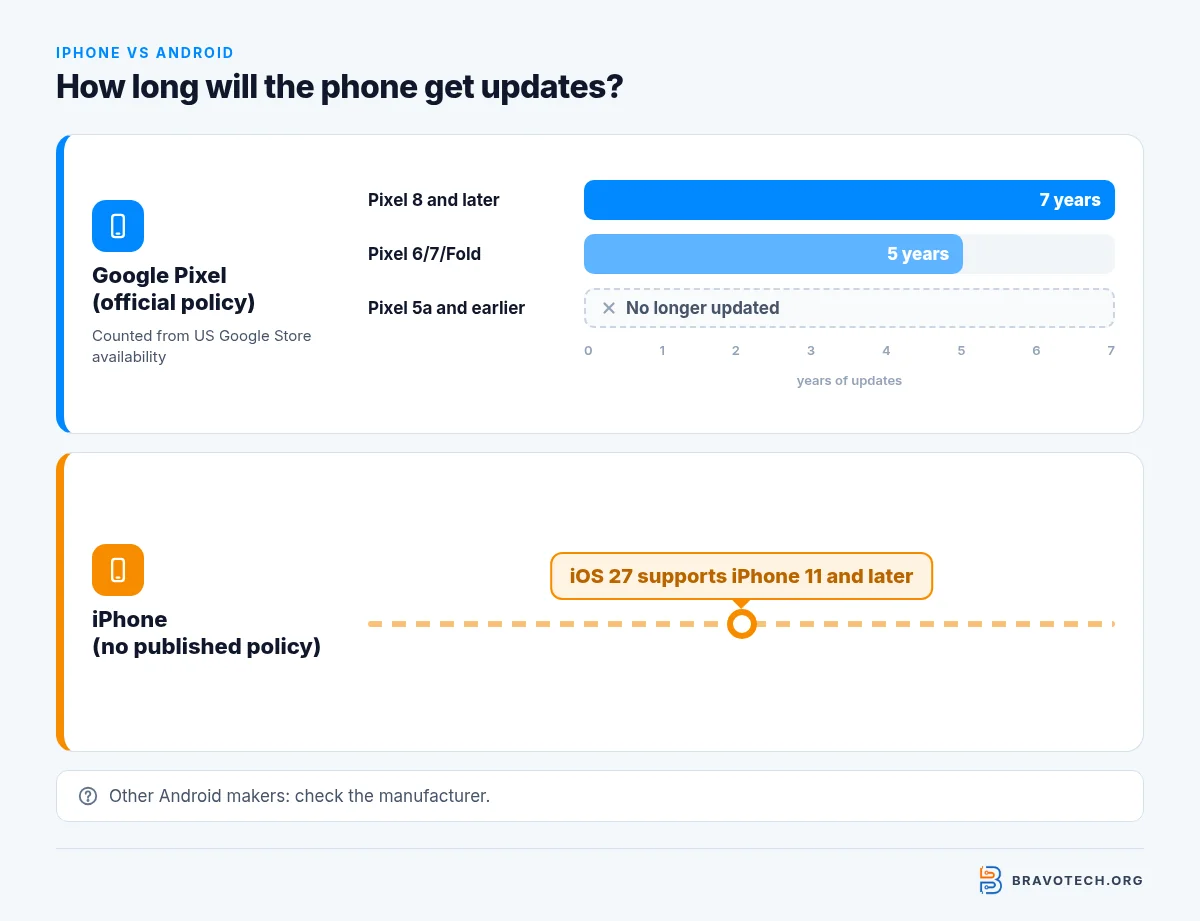
Google is unusually specific: Pixel 8 and later phones, through the current Pixel 11 lineup, get 7 years of OS and security updates counted from when each model first went on sale in the US Google Store. Pixel 6, 6a, 7, 7a and the Pixel Fold get 5 years, and Pixel 5a and earlier no longer get updates. Other Android brands set their own policies, so check the maker’s page for the exact model.
Apple doesn’t publish a fixed number of years. In practice, iOS 27’s compatibility list starts at the iPhone 11 and iPhone SE (2nd generation), so look for your model there before you buy a used iPhone.
Security: what happens if the phone is stolen?
Both platforms now assume a thief might know your passcode. On iPhone, Stolen Device Protection asks for Face ID or Touch ID, with no passcode fallback, for actions like using saved passwords when you’re away from familiar places, and adds a one-hour Security Delay to changes like a new Apple Account password.
On Android, Settings > Google > All services > Theft protection groups Theft Detection Lock, which uses motion and other sensors to lock a phone that’s snatched, and Identity Check, which requires biometrics outside trusted places before you can see passwords, change the screen lock, factory reset or turn off Find Hub. Theft Detection Lock needs Android 10 or later and isn’t offered on Android Go phones.
Messaging and sharing between iPhone and Android
The old green-bubble problem is mostly gone. iPhones on iOS 18 and later support RCS messaging with carriers that offer it, bringing typing indicators, read receipts and full-quality photos to mixed chats. Encrypted RCS is in beta in iOS 26.5. For files, supported Android phones can now send to an iPhone through Quick Share with AirDrop, and other Android phones can share a QR-code link.
Families and kids
Decide which parent tools you’ll use before you buy a child’s phone. Google’s Family Link supervises Android phones and Chromebooks but not iPhones or iPads. Apple’s alternative is Family Sharing with a Child Account, which is required for children under 13 in most of the US (under 18 in Texas) and includes Screen Time controls.
What you give up with each
iPhone
Pros
One company for hardware and software; tight integration with Mac, iPad and iCloud; Stolen Device Protection; Move to iOS brings most Android data across.
Cons
Fewer models and price points; no Family Link supervision; Apple publishes no fixed update window.
Android
Pros
Wide choice of makers and designs; Pixel 8 and later get 7 years of updates; Family Link; Gemini as the built-in assistant; Quick Share to AirDrop on newer phones.
Cons
Update length and features differ by brand and model; some theft features depend on the phone; iMessage stays on Apple devices.
Switching between iPhone and Android
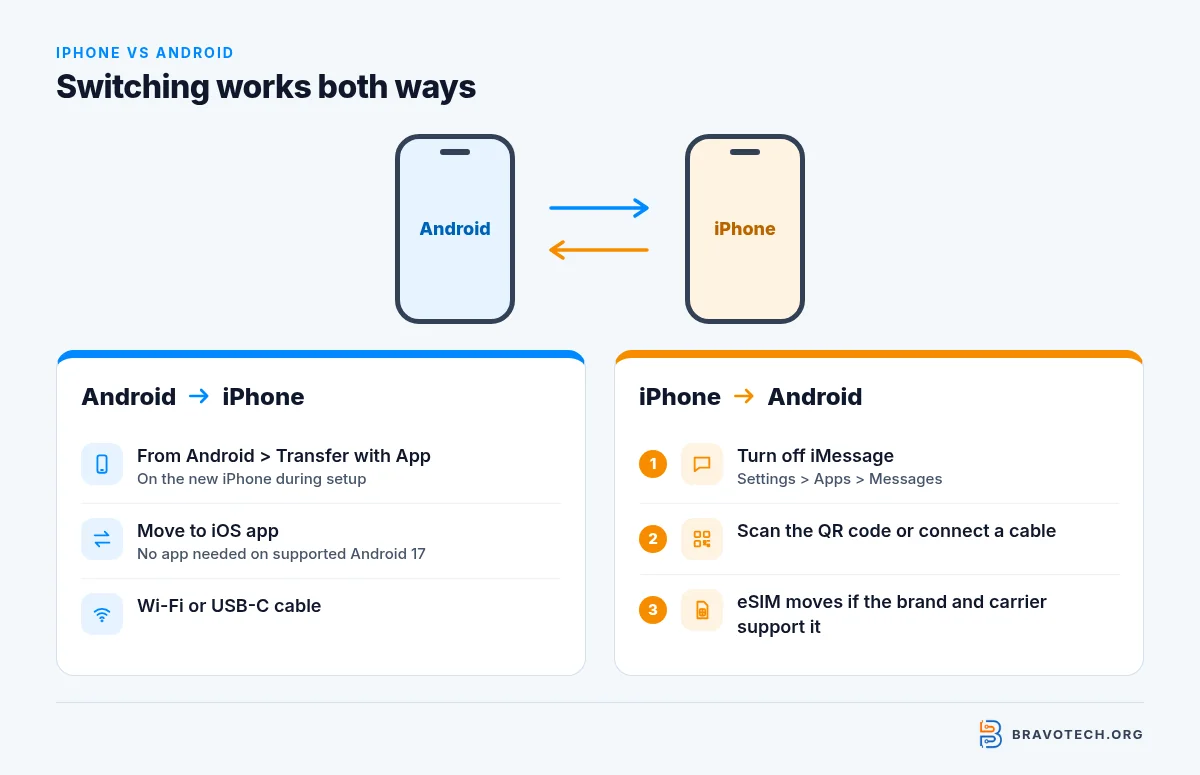
- Android to iPhone: during setup, tap From Android > Transfer with App, then enter the code shown on the iPhone into Move to iOS. A USB-C cable can speed it up.
- iPhone to Android: turn off iMessage first, then follow the new phone’s setup and Android’s switching steps by cable or QR code. eSIM transfer depends on the brand and carrier.
iPhone vs Android questions
Is iPhone better than Android?
Neither is better for everyone. iPhone makes the most sense if you already use a Mac, iPad or other Apple services, because one Apple Account ties them together. Android makes more sense if you want a wide choice of brands, sizes and prices, or you rely on Google’s Family Link for a child. Cross-platform texting and file sharing have improved enough in 2026 that mixed families matter less than they used to.
Which lasts longer, an iPhone or an Android phone?
It depends on the model, not the platform. Google promises Pixel 8 and later 7 years of OS and security updates from US Google Store launch, while Pixel 6 and 7 models get 5. Apple doesn’t publish a fixed number of years, but iOS 27 still runs on the iPhone 11 and newer. For Samsung, Motorola and other brands, check that maker’s update policy before you buy.
Is iPhone more secure than Android?
Both platforms now ship strong theft protection, so this comes down to keeping the phone updated. iPhone’s Stolen Device Protection requires Face ID or Touch ID for sensitive changes away from familiar locations. Android’s Theft protection includes Theft Detection Lock and Identity Check on supported phones. A phone that no longer gets security updates is the bigger risk on either side.
Can iPhone and Android users text each other with RCS?
Yes. iPhones running iOS 18 or later can use RCS when the carrier supports it, which brings typing indicators, read receipts and high-resolution photos and videos to chats with Android users. Apple’s RCS page puts the switch under Settings > Apps > Messages > RCS Messaging. In iOS 26.5, end-to-end encrypted RCS (beta) is rolling out with supported carriers.
Why are texts from Android phones green on iPhone?
Green bubbles mean the message went as SMS, MMS or RCS rather than iMessage, which stays blue between Apple devices. Apple says RCS messages appear in green bubbles just like SMS. The color no longer means a low-quality text: with RCS turned on, green-bubble chats still get photos, videos, typing indicators and read receipts.
Can Android phones AirDrop to an iPhone?
Some can. Google says Quick Share works with AirDrop on the Pixel 8a or later and on certain Samsung, OPPO, OnePlus, vivo, Xiaomi, HONOR, Transsion and Motorola phones. The iPhone owner sets AirDrop to Everyone for 10 Minutes. Other Android phones can send a QR code instead: the iPhone scans it and downloads up to 10 GB per 24 hours from Google’s servers.
Can I switch from Android to iPhone without losing data?
Most of it moves. During iPhone setup, choose From Android, then Transfer with App, and run Apple’s Move to iOS app on the Android phone. A supported Android 17 phone can transfer without the app. Apple lists contacts, message history, photos and videos, mail accounts, calendars and free apps available on both stores. Apple’s list covers free apps that exist on both stores, so check anything else once the transfer finishes.
Can I switch from iPhone to Android and keep my messages?
Yes. Google’s Switch to Android page offers a cable method and a newer method that moves data wirelessly or by cable after you scan a QR code on the new phone. Your eSIM can move too, depending on the phone brand and carrier. Turn off iMessage on the iPhone first, in Settings > Apps > Messages, so texts from iPhone friends don’t get stuck.
Do AirPods work with Android phones?
Yes, as Bluetooth headphones. Google’s switching guide says Android works with major accessory brands, including AirPods, by pairing over Bluetooth. Pairing works like any other Bluetooth headset: open Bluetooth settings on the Android phone and put the AirPods in pairing mode. Compare that against our AirPods vs Galaxy Buds breakdown if you’re switching.
Can I use Google Family Link on a child’s iPhone?
No. Google says iPhones and iPads can’t be supervised with Family Link; parents can install the Family Link app on an iPhone, but the child’s device has to be Android or a Chromebook. For a child with an iPhone, use Apple’s Family Sharing, which lets a parent create a Child Account and manage Screen Time and parental controls. Pick the platform that matches the parent tools you plan to use.
Is Google Assistant still on Android phones?
On phones, Gemini is taking over. Google’s Gemini help page explains that if the Google app is your default assist app, you can make Gemini your mobile assistant. Speakers, smart displays, TVs, cars and Pixel Tablets keep Google Assistant for now. Some features from Assistant aren’t available in every language or country, or for supervised accounts.
Do I need to turn off iMessage before switching to Android?
Yes, and do it before you move your SIM or eSIM. Google’s switching guide says to open Settings > Apps > Messages on the iPhone and switch iMessage off, so you don’t miss messages from friends who still use iPhones. If you skip it, their iPhones may keep trying to send iMessages to your number instead of regular texts.
How this article was made. We drafted this article with the help of AI tools, working from the official pages listed in Sources. Prices, plan limits and steps were checked against those pages on October 28, 2026. Fawad Malik is the credited author; the BravoTech team prepared it under our editorial standards. We did not test these products hands-on for this article. Spot an error? Email [email protected].
Sources
Official Apple and Google sources
- iPhone models compatible with iOS 27 — iPhone User Guide (checked Oct 28, 2026)
- Learn when you’ll get software updates on Google Pixel phones — Pixel Phone Help (checked Oct 28, 2026)
- About Stolen Device Protection for iPhone — Apple Support (checked Oct 28, 2026)
- Protect your device and data with Theft protection — Android Help (checked Oct 28, 2026)
- Turn on RCS messaging on your iPhone — Apple Support, published May 11, 2026 (checked Oct 28, 2026)
- Share files from Android to iPhone — android.com (checked Oct 28, 2026)
- Share content with Quick Share — Google Play Help (checked Oct 28, 2026)
- Move from Android to iPhone or iPad — Apple Support (checked Oct 28, 2026)
- Switch to Android — android.com (checked Oct 28, 2026)
- Get started with Family Link — Google For Families Help (checked Oct 28, 2026)
- Create an Apple Account for your child — Apple Support (checked Oct 28, 2026)
- Use Gemini as your mobile assistant — Gemini Apps Help (checked Oct 28, 2026)
Changelog
- November 2, 2026: Published at this URL again (restored post).
- October 28, 2026: Rewritten from scratch and restored at this URL: decision table, Pixel update policy, iOS 27 compatibility, RCS on iPhone, Quick Share-to-AirDrop, theft protection, Family Link limits and switching steps, all from official Apple and Google pages.
Related reads