Every version-history window on this page was read from the provider’s own help pages on November 17, 2026 (PKT). We didn’t upload, edit or restore any files, and there are no screenshots. There are no affiliate links, rankings or add-on recommendations. Plan rules change, so check the linked page for your account before you rely on a number. How we work: editorial policy.
Quick answer
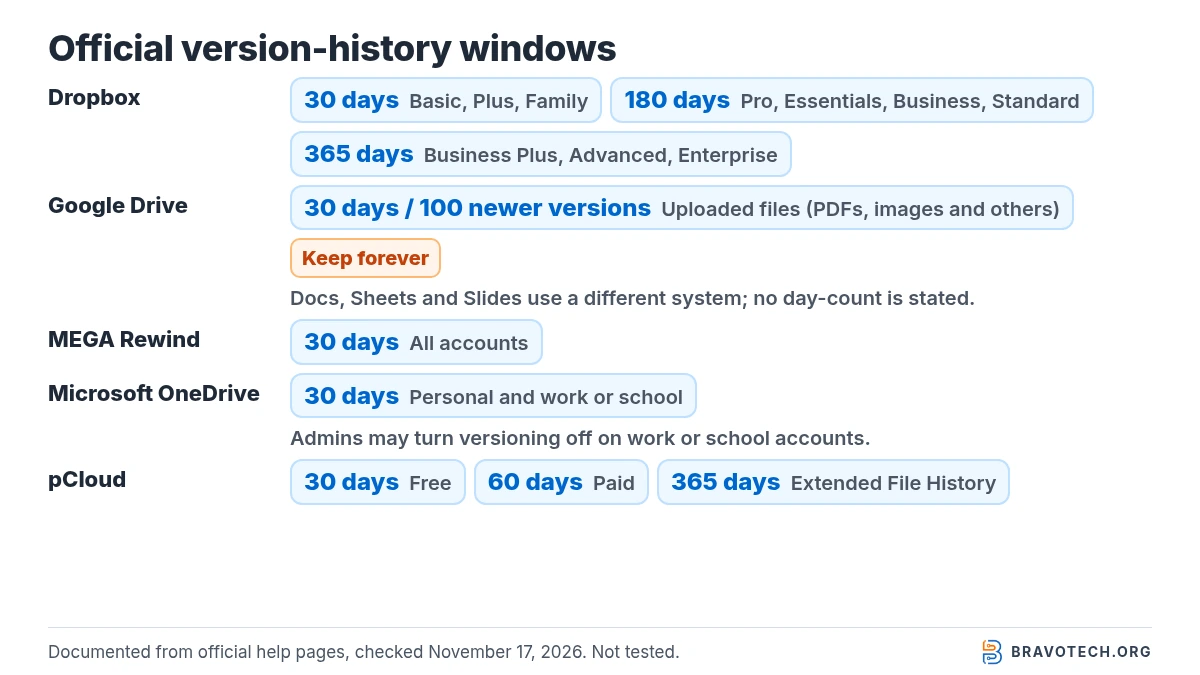
Version history is how long a service keeps earlier copies of a file — not the same as trash. On November 17, 2026, Google Drive Help says an uploaded-file version may be removed after 30 days or 100 newer versions, unless you choose Keep forever. OneDrive retains version history for 30 days. Dropbox Help gives 30, 180 or 365 days by plan. Extended history add-ons are documented features only; Dropbox’s help pages listed no US price on the check date.
Key takeaways
- Trash and version history answer different questions. Deleting a file and overwriting a file are not the same event.
- Google Docs, Sheets and Slides use a different history system from ordinary files uploaded to Drive.
- Dropbox windows follow the plan: 30 days on Basic, Plus and Family; 180 or 365 days on higher plans.
- No official Dropbox Extended Version History price was listed on Help or the public plans page on November 17, 2026, so this article does not invent one.
In this guide
- Version history limits by provider
- How does Google Drive version history work?
- How long does OneDrive keep version history?
- What is the Dropbox version history limit by plan?
- What is Dropbox Extended Version History?
- Do iCloud, pCloud or MEGA publish a comparable window?
- How is version history different from Trash?
- FAQ
- Sources
How long does each cloud service keep previous file versions?
The official windows below were read on November 17, 2026 and are grouped by what each help page actually describes. Providers are listed alphabetically, not as a preference. Where a page splits plans, or treats Docs differently from uploaded files, the table keeps that split. A blank or ‘not documented as a dated version window’ cell means we did not find a comparable official figure, not that the feature is absent in some unstated way.
| Provider | What the official page covers | Documented window or cap | Source, checked |
|---|---|---|---|
| Dropbox | Basic, Plus and Family | 30 days of version history | Dropbox Help, Nov 17, 2026 |
| Dropbox | Professional, Essentials, Business and Standard | 180 days | Dropbox Help, Nov 17, 2026 |
| Dropbox | Business Plus, Advanced and Enterprise | 365 days | Dropbox Help, Nov 17, 2026 |
| Dropbox | Plus with Extended Version History add-on | Extends the default 30 days to one year; not sold if Plus was bought through Google Play or the App Store | Dropbox Help, Nov 17, 2026 |
| Dropbox | Business, Business Plus, Standard, Advanced or Enterprise with the EVH or Data Governance add-on | 10 years of version history, as the add-on article states | Dropbox Help, Nov 17, 2026 |
| Google Drive | Uploaded files (PDFs, images and other files stored in Drive) | A version may be permanently deleted after 30 days or if there are 100 newer versions, unless you click Keep forever | Drive Help, Nov 17, 2026 |
| Google Drive | Google Docs, Sheets and Slides | A different version-history system; the uploaded-file 30-day / 100-version rule is not stated as applying to them | Drive Help, Nov 17, 2026 |
| Microsoft OneDrive | Personal and work or school, unless an admin turned versioning off | File version history is retained for 30 days | Microsoft Support, Nov 17, 2026 |
| Microsoft OneDrive | Microsoft 365 subscribers, restore the entire OneDrive | Roll back changes from the last 30 days (from the recycle-bin article, not the per-file article) | Microsoft Support, Nov 17, 2026 |
| pCloud | Revisions on free plans | Up to 30 days | pCloud Help, Nov 17, 2026 |
| pCloud | Revisions on paid plans | Up to 60 days | pCloud Help, Nov 17, 2026 |
| pCloud | Revisions with Extended File History | Up to 365 days, from the date the add-on is turned on | pCloud Help, Nov 17, 2026 |
| MEGA | Rewind, all accounts | 30 days of data is stored for all accounts; paid plans store longer, but the Rewind article does not state one paid number | MEGA Help, Nov 17, 2026 |
| iCloud Drive | Recently Deleted / recover files on iCloud.com | 30 days — this is a deleted-file window, not a documented file-version history period | iCloud User Guide, Nov 17, 2026 |
How does Google Drive version history work — and is it different for Docs?
Yes: Drive Help treats version history for Docs, Sheets and Slides as different from history for PDFs, images and other files stored in Drive. For those uploaded files, only recent versions are kept unless you click Keep forever. A version might be permanently deleted after 30 days or if there are 100 newer versions. The help page does not state a comparable day-count for Docs history, so this article does not invent one.
Source: Check activity and file versions, opened on November 17, 2026. If the file has already been moved to Trash, the recovery steps are on how to restore a deleted Google Drive file.
How long does OneDrive keep version history?
Microsoft’s restore-a-previous-version article, opened on November 17, 2026, says file version history is retained for 30 days. The page covers personal accounts and work or school accounts; a work or school administrator may have turned document versioning off. You restore one file at a time. The version you restore becomes the current version, and the previous current version stays in the history list.
A related Microsoft article, Restore files deleted from your OneDrive, says Microsoft 365 subscribers can also roll back their entire OneDrive to any point in the last 30 days. That is a whole-library rollback, not the same control as per-file history. Work or school organisations can set their own versioning caps; those admin settings are not treated here as the personal-account default.
What is the Dropbox version history limit by plan?
Dropbox’s version history overview, opened on November 17, 2026, gives three windows: 30 days for Basic, Plus and Family; 180 days for Professional, Essentials, Business and Standard; and 365 days for Business Plus, Advanced and Enterprise. You can’t view or restore versions of files that have been permanently deleted. Version history also does not apply to web-based files such as Google Docs or Microsoft Office Online files.
Dropbox’s deleted-file recovery article uses almost the same day counts, with slightly different plan names in the 365-day group (it also lists Education). The overview page showed an update date of 20 February 2025; the figures above are the ones on the live article we opened. This section follows the version history overview for version limits, and does not mix the two tables into one. For what a plan includes more generally, see what a Dropbox plan includes.
What is Dropbox Extended Version History, and does it have an official price?
It is a documented add-on, not a default on every plan, and Dropbox Help did not list a US dollar price on November 17, 2026. On Plus, the default is 30 days; the add-on extends that to one year, except when Plus was bought through Google Play or the App Store. On listed team plans, Dropbox says the EVH or Data Governance add-on provides 10 years of version history.
Source: Extended version history. A community post is not an official price. If Dropbox later shows a US figure on that help page or on its official plans page, this article should be updated with the new URL and date — until then, no price is stated. Nothing here is a recommendation to buy the add-on.
Do iCloud, pCloud or MEGA publish a comparable version window?
pCloud and MEGA publish related figures; iCloud Drive’s 30-day window is for recently deleted files, not a dated version-history period we could cite. pCloud Revisions are 30 days on free plans, 60 on paid plans, and 365 days with Extended File History from the date you turn that add-on on. MEGA Rewind stores 30 days of data for all accounts; paid plans store longer, but the article does not give one paid number.
Sources: pCloud file recovery and history, How do I use MEGA Rewind? and Recover deleted files on iCloud.com, all opened on November 17, 2026. MEGA also notes that recovering data deleted more than 60 days ago means contacting support; that is a support path, not a guaranteed 60-day restore window, so it is not used as a table figure.
How is version history different from Trash?
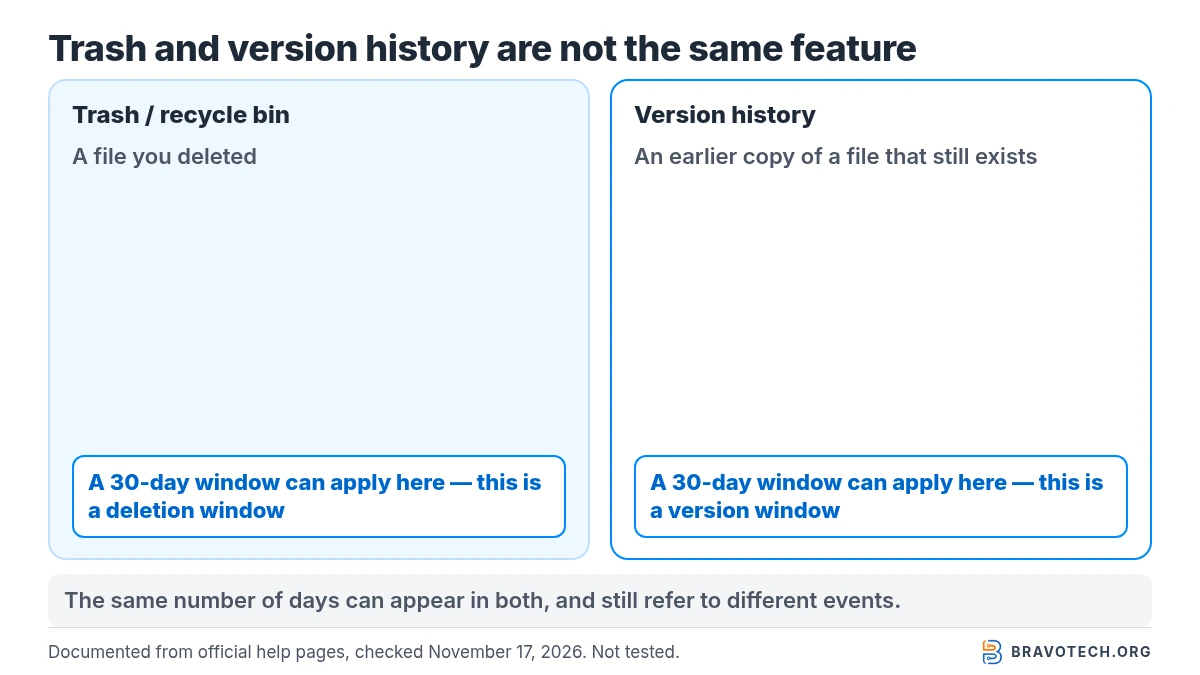
Trash (or a recycle bin) is for a file you deleted. Version history is for an earlier copy of a file that has been edited, replaced or, on some services, removed without being permanently deleted. A 30-day number can appear in both tables and still refer to different events. The companion article, how long deleted files stay in each provider’s trash or recycle bin, holds the deletion windows.
File-size and upload caps are collected separately in cloud storage file-size and upload limits by provider. This page is part of BravoTech’s cloud storage guide and does not pick a service.
FAQ
Can I keep a Google Drive version forever?
For uploaded files, Drive Help describes a Keep forever control next to a version. A checkmark means that version will not be deleted under the 30-day or 100-newer-version rule. Docs, Sheets and Slides follow a different history system.
Does restoring a OneDrive version replace the current file?
Microsoft says the version you restore becomes the current version, and the previous current version becomes the previous version in the list. You restore one file at a time.
Can I restore a Dropbox version after the file was permanently deleted?
No. Dropbox’s version history overview says you can’t view or restore previous versions of files and folders that have been permanently deleted.
Is there an official price for Dropbox Extended Version History?
Not on the official help or public plans pages we opened on November 17, 2026. This article therefore does not list a price.
How this article was made. We drafted this article with the help of AI tools, working from the official pages listed in Sources. Plan limits and steps were checked against those pages on November 17, 2026. It was prepared by the BravoTech team and published under our editorial standards. We did not test these products hands-on for this article. Spot an error? Email [email protected].
Sources
10 official provider pages, each opened on November 17, 2026 (PKT).
Show all 10 sources
- Google Drive Help: Check activity and file versions (30 days or 100 newer versions; Keep forever; Docs/Sheets/Slides are different)
- Microsoft Support: Restore a previous version of a file stored in OneDrive (version history retained for 30 days)
- Microsoft Support: Restore files deleted from your OneDrive (entire OneDrive rollback, last 30 days, for Microsoft 365 subscribers)
- Dropbox Help: Version history overview (30 / 180 / 365 days by plan; updated 20 Feb 2025)
- Dropbox Help: Extended version history (Plus: 30 days to one year; team plans: 10 years with an add-on)
- Dropbox Help: How long does Dropbox keep my deleted files and information?
- pCloud Help: File recovery and history (Revisions 30 / 60 / 365 days)
- MEGA Help Centre: How do I use MEGA Rewind? (30 days stored for all accounts)
- MEGA Help Centre: How long does MEGA keep my deleted data?
- Apple iCloud User Guide: Recover deleted files on iCloud.com (30-day Recently Deleted window, not a version-history figure)
Changelog
- November 25, 2026: First published. All version-history windows checked on November 17, 2026.
Related reads