The steps and time limits here are Google’s own, taken from Drive, Workspace and Docs help pages we opened on November 8, 2026. We didn’t delete and restore test files, and we don’t recommend third-party “recovery” software for cloud files. One part of Google’s recovery page only appears when you’re signed in, and we say where that leaves gaps. No affiliate links. More on how we work: editorial policy.
Quick answer
Go to drive.google.com, click Trash on the left, right-click the file and choose Restore. Google keeps trashed files for 30 days before deleting them forever. If the file isn’t in your Trash, check whether someone else owned it or it lived in a shared drive (each has its own Trash). If it was deleted forever, sign in and reload Google’s recovery help page to see whether a recovery request is offered; on work or school accounts, ask your admin quickly.
Key takeaways
- 30 days in Trash, then Google deletes files forever, and clicking Empty trash deletes them forever right away.
- Only the owner can delete a My Drive file; if you didn’t own it, the owner (or the shared drive’s Trash) is where to look.
- Shared drives: anyone with Contributor access or higher can restore from that drive’s Trash for up to 30 days.
- Workspace admins can restore Drive files for up to 25 days after a user empties their Trash, but only by date range, not one file at a time.
- WhatsApp backups stored in Drive can’t be restored by Google, because they’re end-to-end encrypted by WhatsApp.
How do I recover deleted files from Google Drive?
Restore it from Drive’s Trash, where files normally remain for 30 days unless permanently deleted sooner.. On a computer, go to drive.google.com, click Trash, right-click the file and click Restore. Sorting by “Trashed date” shows how long ago each file was deleted, so you can see how much time is left. The restored file goes back into your Drive (Google Drive Help).
On a computer
- Go to drive.google.com and sign in to the account that owned the file.
- On the left, click Trash.
- Sort by Trashed date if the list is long, or search for the file name.
- Right-click the file and click Restore.
On Android, iPhone or iPad
- Open the Google Drive app and open your Trash.
- Next to the file you want back, tap Menu (Google’s name for the file’s options icon).
- Tap Restore.
Google’s Android and iPhone help pages give the same restore steps and say that if you deleted something recently in Drive or the Drive desktop app, you might be able to restore it yourself this way (Google Drive Help).
Can I recover Google Drive files after 30 days or after emptying Trash?
Not from Trash. Google says trashed files are deleted forever after 30 days, and Empty trash deletes them forever immediately. Google’s recovery help page shows a file-recovery request only to signed-in users, so sign in and reload it to see what’s offered for your account. We couldn’t view that section signed out, so we can’t confirm its conditions. Work or school accounts have an admin route (Google Drive Help).
Treat a recovery request as a long shot rather than a guarantee, and act quickly: on Google Workspace accounts, Google’s own admin documentation sets a 25-day limit after permanent deletion, after which the data is purged (Google Workspace Admin Help). Recovery programs made for your own hard drive can’t reach files that only lived in Google’s cloud.
Emptying Trash is the opposite of recovery
Emptying Trash is the usual fix when Google Drive storage is full, because trashed files still count toward your storage. It is also the step that makes recovery hardest. Before you click Empty trash or Delete forever, check that nothing in the list is needed, by you or by anyone you shared it with: Google says people you shared a file with lose access when you permanently delete it.
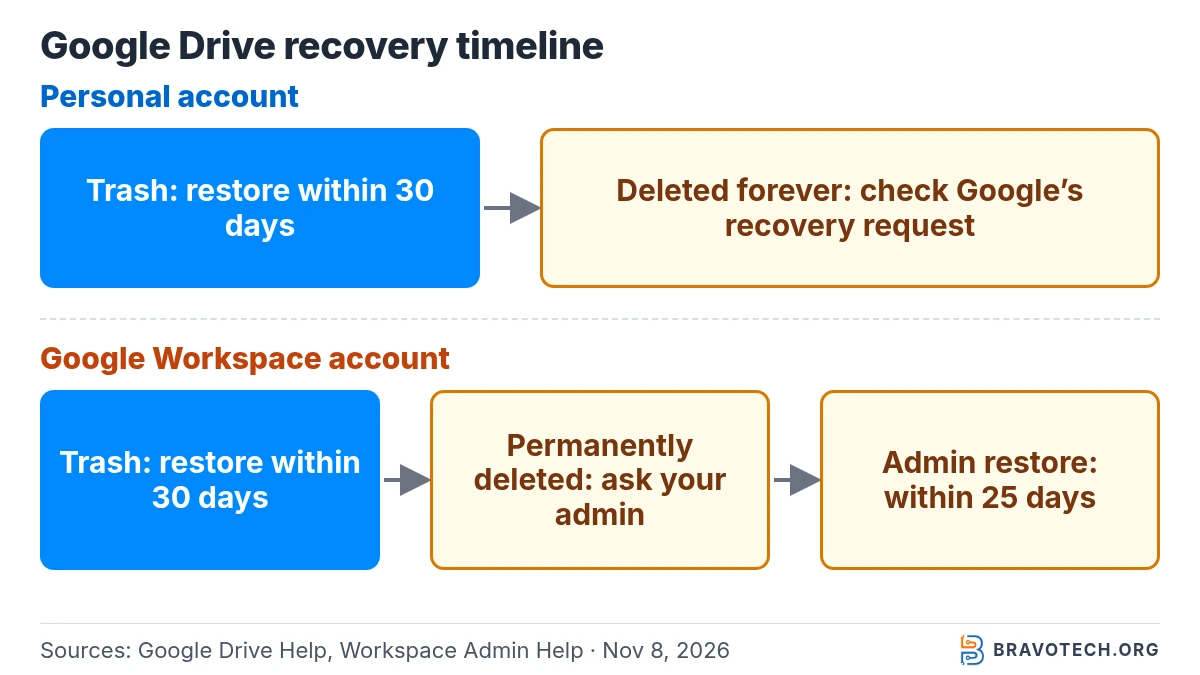
Google Drive recovery timeline: what’s possible when
The answer to “can I get it back?” depends on how long ago, and how, the file was deleted. This table lines up Google’s documented windows:
| Stage | What has happened | Who can restore | How |
|---|---|---|---|
| Day 0 to 30: in Trash | File moved to Trash. It still uses storage, and people you shared it with can still open it | The owner (for shared drives, members with Contributor access or higher) | Trash → Restore |
| Trash emptied, Delete forever, or 30 days passed | Deleted forever from Drive; shared users lose access | Personal accounts: possibly Google, through the signed-in request on its help page (not guaranteed). Workspace: an admin | Sign in and reload Google’s recovery page; Workspace users ask their admin |
| Up to 25 days after permanent deletion (Workspace) | Admin restoration may be available, subject to limits. | Workspace admin with user management privilege | Admin console → Users → Restore data → Drive, by date range |
| More than 25 days after permanent deletion (Workspace) | Google purges the data | No one can restore it to Drive | If your organization uses Google Vault, retained data may be searchable and exportable, not restorable |
Why isn’t my deleted file in Google Drive’s Trash?
Usually because you weren’t the owner, or the file lived in a shared drive. Google lets only a file’s owner delete it; if you aren’t the owner, clicking Remove only takes it out of your Drive and others keep access. A file the owner deleted sits in the owner’s Trash, and shared drive files go to that shared drive’s Trash, not yours (Google Drive Help).
| Situation | Where to look |
|---|---|
| You owned the file (for example, you created it) | Your Trash at drive.google.com |
| Someone else owned it and deleted it | Their Trash: ask the owner to restore it within 30 days |
| You clicked Remove on a file you don’t own | Not in Trash. The owner still has it; ask them to share it again |
| It was in a shared drive | Trash → “Deleted from” → choose that shared drive |
| You deleted it in a synced folder on your computer | Your Drive Trash online (see the desktop section below) |
How do I restore deleted files in a Google shared drive?
Open Trash at drive.google.com, use the “Deleted from” menu at the top to pick the shared drive, then select the file and click Restore. Each shared drive has its own Trash, and files stay there for 30 days. Anyone with Contributor access or higher can restore, while only Managers can delete files forever before the 30 days are up (Google Workspace).
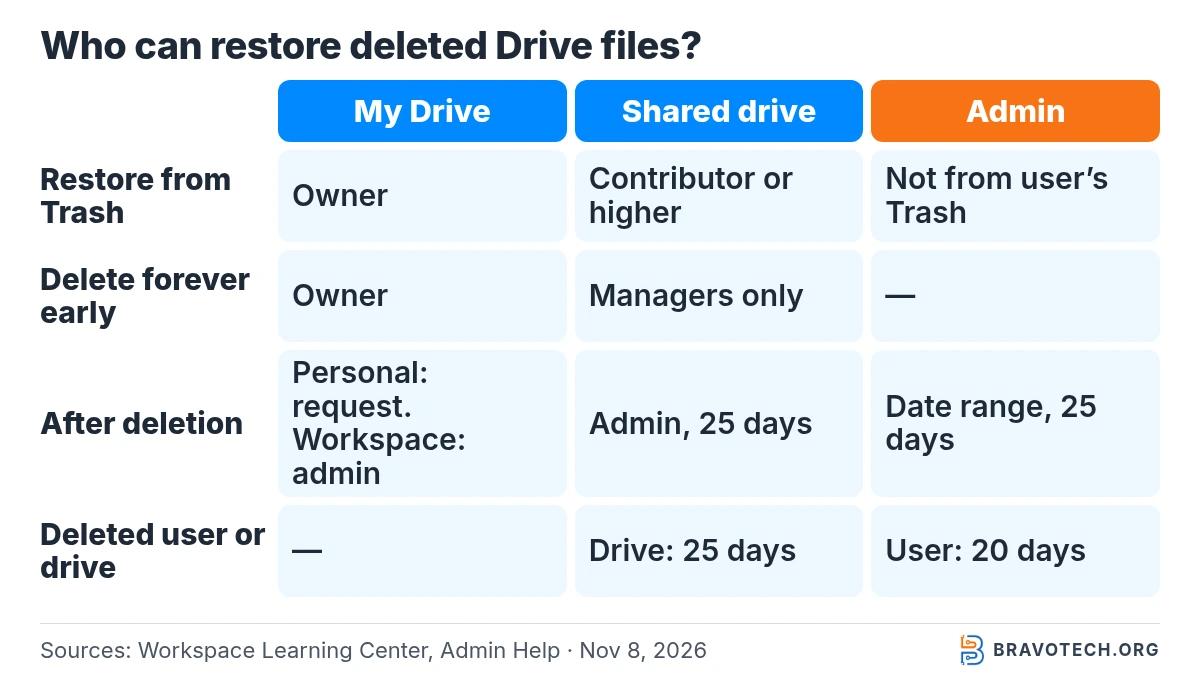
Who can restore what? Google’s documentation draws these lines between My Drive, shared drives and admins:
| My Drive | Shared drive | Workspace admin | |
|---|---|---|---|
| Who owns files | The person who created or uploaded them | The team | Not applicable |
| Who can move files to Trash | The owner | Content manager or Manager | Not applicable |
| Who can restore from Trash (30 days) | The owner | Contributor, Content manager or Manager | Admins can’t restore data that is still in a user’s Trash; the user restores it |
| Who can delete forever early | The owner (Empty trash / Delete forever) | Managers only | Not applicable |
| After permanent deletion | Personal: signed-in request on Google’s help page. Workspace: admin | Admin, if removed from the shared drive’s Trash within 25 days | Restores by date range within 25 days; deleted shared drives within 25 days |
New to shared drives or folder sharing? Our guide to sharing a Google Drive folder explains the difference between sharing from My Drive and working in a team space.
How can a Google Workspace admin recover permanently deleted Drive files?
In the Google Admin console, an admin can restore a user’s Drive data for up to 25 days after the user empties their Trash. The restore covers everything removed in a date range you pick, not single files, and can take several days to appear. Files return to their original location, but the user must share them again (Google Workspace Admin Help).
- Ask the user roughly when the file was emptied from Trash, so you restore the smallest date range possible.
- In the Admin console, go to Menu > Directory > Users.
- Point to the user, click More options > Restore data.
- Pick a date range that includes the day the item was emptied from Trash (within the last 25 days).
- Under Application, choose Drive, then click Restore.
Google lists limits worth knowing before you start: you need the user management privilege, only one restore project can run at a time, a restore stops if it would push the user or organization over its storage limit, and files still in the user’s Trash aren’t included. If the whole user account was deleted, the window is 20 days from account deletion. Deleted shared drives can be restored from Apps > Google Workspace > Drive and Docs > Manage shared drives within 25 days (Google Workspace Admin Help).
Can I recover deleted text or an older version of a Google Doc?
Yes, with version history, as long as the file itself still exists and you can edit it. Open the Doc, Sheet, Slides file or Vids video, click Last edit at the top right, choose an earlier version in the right panel and click Restore this version. To keep the current file intact, use More > Make a copy on the older version instead (Google Docs Editors Help).
Google notes one side effect for Sheets: restoring an earlier version clears the cell-by-cell edit history for changes made before the restore, so make a copy if you need that history. If the whole Doc was deleted, restore it from Trash first; Google says all your deleted files are listed there.
Does deleting a file on my computer delete it from Google Drive?
Yes, if the file is synced with Google Drive for desktop. Google says that whether you mirror or stream files, anything you put in the trash is put in the trash everywhere. That works in your favor for recovery: the file shows up in your Drive Trash online, where you can restore it within 30 days (Google Drive Help).
Photos and videos backed up to Google Photos from Drive for desktop are a separate case: Google says deletions don’t sync between your computer and Google Photos. Setup details are in our Google Drive for desktop guide.
How to avoid losing Drive files next time
Drive syncs deletions, so it isn’t a backup on its own. Keep a second copy of anything you can’t afford to lose somewhere Drive’s Trash can’t touch. Our explainers on cloud storage vs cloud backup and the 3-2-1 backup rule show how to set that up. Google’s own tip for shared files: if other people still need a file you plan to delete, transfer ownership to someone else first, so their access isn’t lost.
FAQ
Can I get back a file I permanently deleted from Google Drive?
Sometimes. Trash is no longer an option, but Google shows a file-recovery request on its help page to signed-in users, so sign in and reload that page. On a Google Workspace account, your admin may restore eligible Drive data within 25 days after permanent deletion.. After that window, Google says Workspace data is purged.
Do files in Google Drive’s Trash count toward my storage?
Yes. Google says trashed files keep counting toward your storage until they’re permanently deleted, which is why emptying Trash frees space. Make sure you won’t need them first.
Can people I shared a deleted file with still open it?
While the file is in your Trash, yes: Google says anyone you shared it with can keep accessing it until it’s permanently deleted. Once you delete it forever, they lose access.
Can I recover a WhatsApp backup deleted from Google Drive?
Not through Google. WhatsApp manages its backups even when they’re stored in your Google Account, and Google says it can’t view, access or restore them because of WhatsApp’s end-to-end encryption. Google points you to the WhatsApp Help Center.
How long does an admin restore take?
Google says it can take several days for restored data to reappear, depending on how much is being restored. The files return to the user’s Drive in their original location and need to be shared again.
How this article was made. We drafted this article with the help of AI tools, working from the official pages listed in Sources. Steps were checked against those pages on November 8, 2026. Syed Saud Ahsan is the credited author; the BravoTech team prepared it under our editorial standards. We did not test these products hands-on for this article. Spot an error? Email [email protected].
Sources
9 official Google help pages, each opened on November 8, 2026 (PKT) while signed out. The signed-in recovery request section of Google’s Drive recovery page was not visible to us.
Show all 9 sources
- Google Drive Help: Recover a deleted file in Google Drive (Computer)
- Google Drive Help: Recover a deleted file in Google Drive (Android; iPhone & iPad tab shows the same steps)
- Google Drive Help: Delete files in Google Drive
- Google Workspace Learning Center: What are shared drives?
- Google Workspace Learning Center: How file access works in shared drives
- Google Workspace Learning Center: Add files & folders to a shared drive (delete and restore section)
- Google Workspace Admin Help: Recover deleted files and folders for Drive users
- Google Workspace Admin Help: Delete or restore a shared drive and its files for your users
- Google Docs Editors Help: Find what’s changed in a file (version history)
Changelog
- November 10, 2026: First published. Trash restore steps, the recovery timeline, shared drive and admin restore rules, and version history, checked against Google’s help pages on November 8, 2026.
Related reads