Every step below comes from Apple’s AirPods and iPhone user guides and its lost-AirPods support page, re-read on November 3, 2026. Menu names follow Apple’s current iOS 27 guide, so older versions may word things slightly differently.
Quick answer
Open the Find My app, tap Devices, then tap your AirPods. You’ll see them on a map. If they’re close, tap Play Sound or Find; if not, tap Get Directions. No Apple device with you? Sign in at iCloud.com/find and choose All Devices. This only works if Find My was on before they went missing.
Key takeaways
- Dead or offline AirPods show their last known location, and you get a notification when they come back online.
- The Find My network can show supported models for up to 24 hours after they last connected, even far from your phone.
- A sound only plays on AirPods that are connected, or, with the Find My network off, the next time they connect.
- Newer models track each earbud and the case separately. Older ones show one bud at a time.
- Lost Mode puts your contact details on the AirPods, but it needs the Find My network on beforehand.
- Gone for good? Apple sells replacement AirPods or a replacement case.
How do you find lost AirPods?
Use the Find My app on your iPhone: tap Devices, then the name of your AirPods, and check the map. If they’re out of the case you may have to pick the left or right bud. Far away? Tap Get Directions to open the location in Maps. Nearby? Tap Play Sound and listen for beeps, or use Find Nearby if your model shows it (Apple Support).
- Open the Find My app on your iPhone or iPad.
- Tap Devices, then tap your AirPods.
- Look at the map. Tap Get Directions if they’re somewhere else.
- When you’re close, tap Play Sound, or Find / Find Nearby if it’s offered.
- Still missing? Swipe up and turn on Lost Mode so a finder can contact you.
Can you find AirPods if they are dead or offline?
Partly: you can usually see where they were last, but you can’t make them beep. Apple says AirPods that are out of range or need charging may show a last known location, “Offline” or “No location found”. You might get directions to that last spot, but Play Sound and Find Nearby won’t work. If they come back online, Find My sends a notification to your paired devices (Apple Support).
Supported models with the Find My network turned on do better: Apple says you can see their location for up to 24 hours after they last connect to your device, even when they’re not nearby. With the network off, or on a model that doesn’t support it, Find My shows the last time and place they were connected (AirPods User Guide).
What does “Offline” or “No location found” mean?
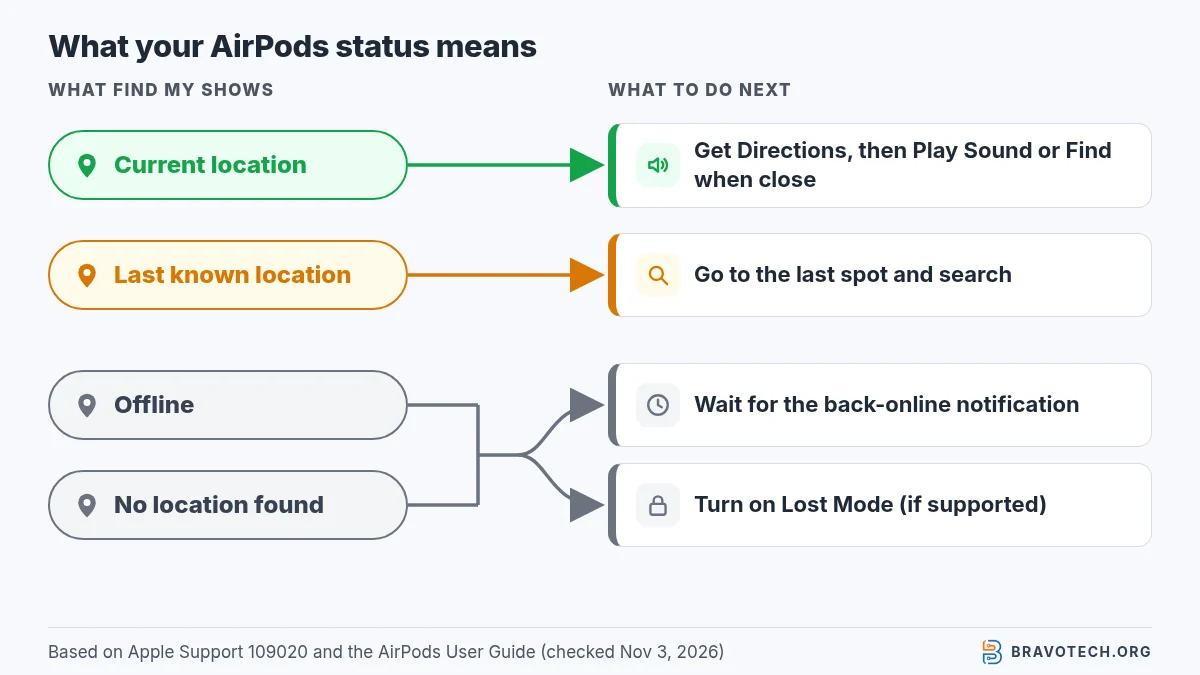
Here’s how to read each state in Find My, using Apple’s own descriptions:
| What Find My shows | What it means | What you can do |
|---|---|---|
| A current location on the map | The AirPods are reporting where they are now | Get directions; Play Sound or Find when you’re close |
| A last known location | They’re out of range or need charging; this is where they were last seen | Get directions to that spot and search there |
| “Offline” | They aren’t reporting right now, usually out of range or out of battery | Check the last known location; wait for the back-online notification |
| “No location found” | Find My has no location to show | Retrace your steps; turn on Lost Mode if your model supports it |
How do you make lost AirPods play a sound?
In Find My, select your AirPods and tap Play Sound. Apple says they play a sound for a few minutes, or until you stop it. It works on AirPods that are out of their case. If they aren’t connected to your device and the Find My network is off, the sound plays the next time they connect. Apple’s tip for separated buds is below (AirPods User Guide).
How do you find AirPods that are nearby?
Select your AirPods in Find My on iPhone or iPad, tap Find, then follow the on-screen instructions. Apple lists this for AirPods 3, AirPods 4 (ANC), AirPods 5, AirPods Pro and AirPods Max, such as when they’re in another room. With AirPods Pro 2 or Pro 3 you may see an arrow and an approximate distance, and a flashlight option for dark spots (AirPods User Guide).
How do you find just one lost AirPod?
On most models, find the one the map shows, put it in the case, then refresh the map to see the other. Apple says most AirPods show only one bud’s location at a time when they’re separated. AirPods 4 (ANC), AirPods 5 with Wireless Charging Case, AirPods Pro 2 and Pro 3 show each bud and the case. While a sound plays, tap Left or Right to mute one (AirPods User Guide).
Can you find a lost AirPods case?
Only on newer models: AirPods 4 (ANC), AirPods 5 with Wireless Charging Case, AirPods Pro 2 and AirPods Pro 3. On these, the case appears on the map, can play its own sound and can be marked as lost separately. Pro 2 and Pro 3 cases can also be located precisely with an Ultra Wideband (UWB) iPhone. You can’t play a case sound from iCloud.com, only the Find My app (AirPods User Guide).
For older models Apple doesn’t describe a way to locate the case on its own, so the map shows the earbuds only.
How do you find AirPods without an iPhone?
Go to iCloud.com/find in any web browser, sign in with your Apple Account, select All Devices, then your AirPods. From there you can see their location and click Play Sound. Apple notes the web experience might be different and some functions might not be available, such as the case sound. A Mac, iPad or Apple Watch with the Find My app works too (AirPods User Guide, Apple Support).
Which Find My features does your AirPods model have?
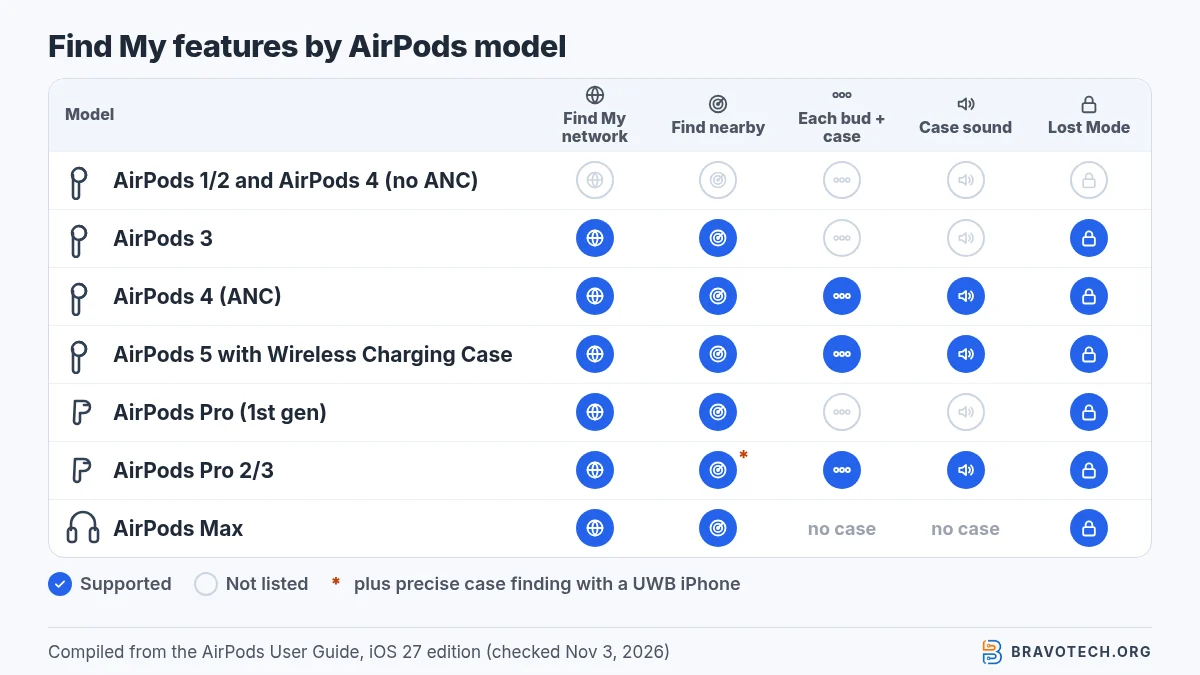
Apple spreads these details across several sections of its guide. We pulled them into one table. Not sure which model you have? Apple’s AirPods guide includes a “Which AirPods do I have?” page.
| Model | Find My network (up to 24 h) | Find nearby | Shows each bud + case | Case sound | Lost Mode |
|---|---|---|---|---|---|
| AirPods (1st or 2nd generation), AirPods 4 (no ANC) | Not listed: last connected place only | Not listed | No, one bud at a time | No | Not listed |
| AirPods 3 | Yes | Yes | No, one bud at a time | No | Yes |
| AirPods 4 (ANC) | Yes | Yes | Yes | Yes | Yes, buds and case separately |
| AirPods 5 with Wireless Charging Case | Yes | Yes | Yes | Yes | Yes, buds and case separately |
| AirPods Pro (1st generation) | Yes | Yes | No, one bud at a time | No | Yes |
| AirPods Pro 2, AirPods Pro 3 | Yes | Yes, plus precise case finding with a UWB iPhone | Yes | Yes | Yes, buds and case separately |
| AirPods Max | Yes | Yes | Single headset, no case | N/A | Yes |
How do you put AirPods in Lost Mode?
In Find My, select your AirPods, turn on Lost Mode, then follow the prompts to add your contact details. That lets someone who finds them get in touch. Apple supports this on AirPods 3, AirPods 4 (ANC), AirPods 5 with Wireless Charging Case, AirPods Pro and AirPods Max. It only works if the Find My network was on before the AirPods were lost (AirPods User Guide, Apple Support).
How do you turn on the Find My network for AirPods?
Wear your AirPods connected to your iPhone, open Settings, tap their name near the top, then turn on Find My Network. If you don’t see the switch, tap Find My first. Apple’s support article gives an alternative path: Settings > Bluetooth, tap the More Info button next to your AirPods, then Find My. Do this now, because Apple says it must be on before they’re lost (AirPods User Guide, Apple Support).
Borrowed or shared AirPods
Sharing AirPods? Apple says that when supported AirPods are used with more than one Apple Account, only the person who turned on the Find My network can see them in Find My. You may also get an alert if someone else’s AirPods are travelling with you (AirPods User Guide).
How do you get alerts when you leave AirPods behind?
In Find My, tap Devices, select your AirPods, then turn on Notify When Left Behind. It needs the Find My network on and notifications allowed for the Find My app. You can add Trusted Locations, such as home, where you won’t get alerts. Apple lists AirPods 3, AirPods 4 (ANC), AirPods 5 with Wireless Charging Case, AirPods Pro and AirPods Max (AirPods User Guide, iPhone User Guide).
What if you still can’t find your AirPods?
Turn on Lost Mode, keep an eye out for the back-online notification, and replace them if they don’t turn up. Apple’s service page says that if you lose your AirPods or the case, you can order a replacement. Apple doesn’t quote a price on that page; check your coverage there (Apple Support).
Apple also notes that the Find My network might be unavailable in some countries and regions due to local laws (Apple Support).
FAQ
Can I find my AirPods with an Android phone?
Not with an app, but you can open iCloud.com/find in the phone’s browser and sign in with the Apple Account the AirPods are paired to. Apple says some functions may not be available there. If you’re weighing earbuds for Android, see AirPods vs Galaxy Buds.
Do I need Find My turned on before I lose them?
Yes. Apple says you must turn on Find My on a paired device before they’re lost, and Lost Mode needs the Find My network on in advance.
Why does the map show only one AirPod?
Most models show one bud at a time when they’re separated. Find it, put it in the case, then refresh to see the other. Newer models show both buds and the case.
I found my AirPods but they won’t connect. What now?
If charging them in the case doesn’t help, our guide to resetting AirPods covers the steps.
Can I find AirPods from my Apple Watch?
Yes. Open Find My on the watch and select your AirPods. Apple says this needs a Wi-Fi or cellular connection.
How this article was made. We drafted this article with the help of AI tools, working from the official pages listed in Sources. Steps were checked against those pages on November 3, 2026. Fawad Malik is the credited author; the BravoTech team prepared it under our editorial standards. We did not test these products hands-on for this article. Spot an error? Email [email protected].
Sources
Four Apple pages, each opened on November 3, 2026 (PKT).
Show all 4 sources
Changelog
- November 5, 2026: First published. Find My steps, offline behaviour, model features, Lost Mode and separation alerts checked against Apple’s guides on November 3, 2026.
Related reads