Reviewed by Syed Saud Ahsan, Editor · November 12, 2026
Every limit here comes from the provider’s own help or pricing pages, read on November 11, 2026. We didn’t upload test files or measure speeds, and documented limits can differ from what a slow or interrupted connection allows. Where a provider’s own pages give different numbers, we show both. No affiliate links, no rankings. How we work: editorial policy.
Quick answer
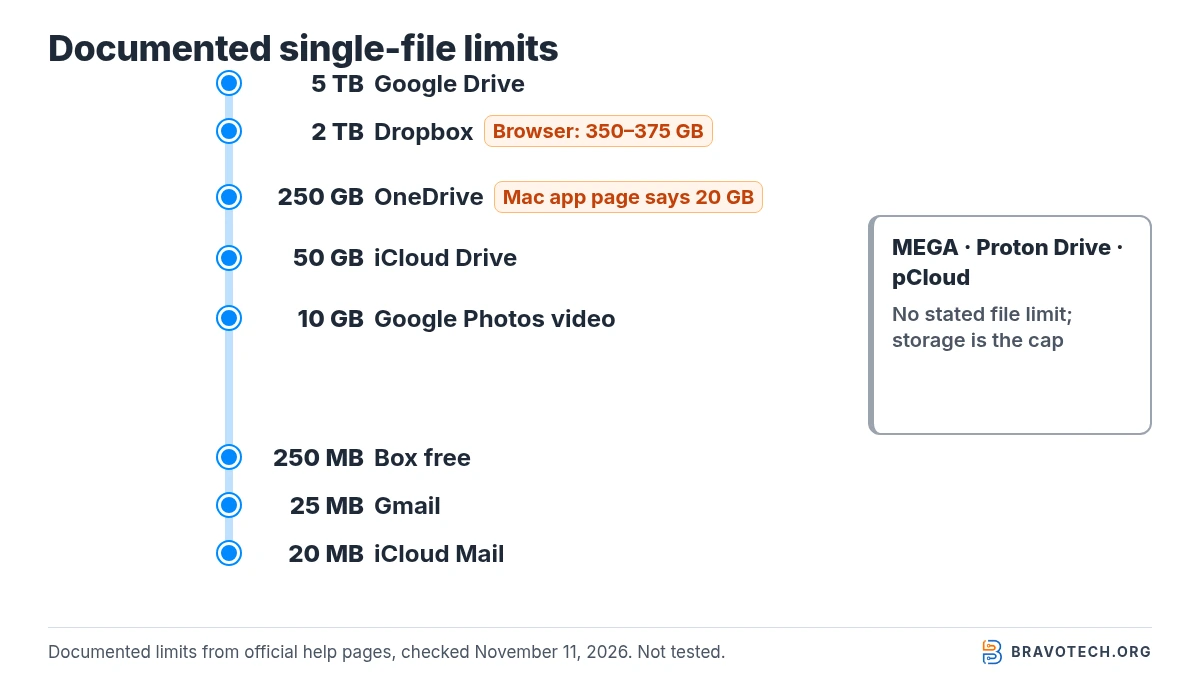
The documented single-file limits on November 11, 2026 were: Google Drive up to 5 TB, Dropbox 2 TB, OneDrive 250 GB and iCloud Drive 50 GB. Box ties the limit to the plan, from 250 MB on its free plan to 500 GB on Enterprise Advanced. MEGA, Proton Drive and pCloud say they don’t cap file size. In every case, the file also has to fit in your free storage.
Key takeaways
- Storage is often the real ceiling. A 5 TB file limit doesn’t help on a 15 GB free account.
- Browser uploads can have lower limits than desktop apps: Dropbox points large uploads to its desktop app, and OneDrive drops to 300 MB in older browsers.
- Email is much tighter than storage: 25 MB per Gmail message and 20 MB per iCloud Mail message before both switch to links (Drive or Mail Drop).
- Some pages contradict each other. Dropbox gives 375 GB and 350 GB for browser uploads; Microsoft gives 250 GB and, for its Mac app, 20 GB.
- Sharing has its own limits, such as monthly shared-link traffic at pCloud and Box and daily link downloads on Sync.com’s free plan.
Cloud storage file-size limits by provider (checked November 11, 2026)
The table gathers each provider’s documented single-file limit and the upload route it applies to. Providers write these rules differently: some give one number for everything, others split by browser, desktop app, plan or file type. We’ve kept each figure to what the official page states, listed providers alphabetically, and marked where a number only covers one route.
| Provider | Largest single file (documented) | Route or plan it applies to | Lower limits to know | Source |
|---|---|---|---|---|
| Box | 250 MB to 500 GB | Depends on plan | Free Individual 250 MB; Personal Pro 5 GB; Business Starter 2 GB | Box |
| Dropbox | 2 TB | Desktop app (and API) | Browser: 375 GB on one help page, 350 GB on another | Dropbox Help |
| Google Drive | Up to 5 TB | Files that aren’t converted to Google formats | Docs 50 MB when converted; Sheets 100 MB or 20 million cells; Slides 100 MB | Google Drive Help |
| iCloud Drive | 50 GB | Per file or folder | — | Apple |
| MEGA | No stated limit | Website and apps | Browser transfers have limitations; MEGA suggests its desktop app | MEGA Help |
| OneDrive (personal) | 250 GB | Sync, upload and download; also files within a zip | 300 MB in older browsers; Mac desktop app page says 20 GB | Microsoft Support |
| pCloud | No stated limit | “Upload files of any size” | Shared-link traffic capped per month by plan | pCloud |
| Proton Drive | No stated limit | Uploads and sharing | Limited by your storage (5 GB free) | Proton |
| Sync.com (free plan) | 5 GB | Adding files to a shared folder | General per-file limit not stated on the pages we could read | Sync.com Help |
Is the file-size limit or your storage the real limit?
For most personal accounts, free storage runs out long before the file-size limit matters. Google Drive accepts files up to 5 TB, but a free Google Account holds up to 15 GB across Gmail, Drive and Photos combined. Dropbox makes the same point on its own help page: on a 2 GB account you can upload one 2 GB file or several smaller ones adding up to 2 GB.
So the practical question is two-part: is the file under the documented limit, and is there that much free space? For plan sizes and prices, see our US cloud storage price tracker, Google One plans and iCloud+ plans.
What is the Google Drive file size limit?
Google Drive stores files up to 5 TB each, as long as they stay in their original format. Converting to Google’s own formats brings much lower limits: 50 MB for a text file converted to Docs (and up to 1.02 million characters), 100 MB or 20 million cells for Sheets, and 100 MB for Slides. Gmail and Google Photos have their own, separate limits.
| Google service | Limit | Source |
|---|---|---|
| Google Drive, files kept in original format | Up to 5 TB per file | Drive Help |
| Google Docs | 1.02 million characters; 50 MB when converting a text document | Drive Help |
| Google Sheets | 20 million cells or 100 MB (created or converted) | Drive Help |
| Google Slides | 100 MB for converted presentations | Drive Help |
| Gmail attachments (personal accounts) | 25 MB; larger files go as a Drive link | Gmail Help |
| Google Photos backup | Photos up to 200 MB or 200 MP; videos up to 10 GB | Photos Help |
Files stored in Drive still count toward your shared Google storage (Google One Help). To move email attachments out of Gmail, see saving Gmail attachments to Google Drive.
What is the OneDrive file size limit?
Microsoft’s limits page sets 250 GB per file for OneDrive sync, uploads and downloads, including files inside a zip. Its website troubleshooting page also gives 250 GB in Microsoft Edge and other recent browsers, but only 300 MB in older browsers. OneNote notebooks stored in OneDrive are limited to 2 GB. Work or school accounts follow different rules.
Microsoft’s upload page for the Mac desktop app says files uploaded with that app can be up to 20 GB, which doesn’t match the 250 GB elsewhere, and its website troubleshooting page gives 15 GB for work or school accounts; see “Where official pages disagree”. For how the desktop app handles big folders, see OneDrive Files On-Demand.
What is the Dropbox file size limit?
Dropbox’s help centre puts the maximum at 2 TB per file, which it spells out as 2,199,019,061,248 bytes. That figure applies to the desktop app and the Dropbox API. In a web browser, Dropbox warns that very large uploads may time out, and it suggests the desktop app for big files. Mobile uploads of large files may also be unreliable, according to the same page.
Your plan’s storage still applies: Dropbox Basic is 2 GB and Plus is 2 TB. Our explainer on what Dropbox is covers the apps.
What is the iCloud Drive file size limit?
Apple’s Mac User Guide says an individual file or folder in iCloud Drive can’t exceed 50 GB. Anything bigger shows a status icon saying it couldn’t be stored in iCloud. iCloud Mail is far smaller: 20 MB per message, or up to 5 GB using Mail Drop, with up to 1,000 messages a day and 500 recipients per message.
| Apple service | Limit | Source |
|---|---|---|
| iCloud Drive | 50 GB per file or folder | Mac User Guide |
| iCloud Mail message size | 20 MB; up to 5 GB with Mail Drop | Apple Support |
| iCloud Mail sending | 1,000 messages a day; 1,000 recipients a day; 500 recipients per message | Apple Support |
Storage for those files comes from your iCloud plan; iCloud storage full covers what to do when it fills up.
What is the Box upload limit?
Box sets a different single-file upload limit for each plan. The free Individual plan allows 250 MB per file, Personal Pro 5 GB and Business Starter 2 GB. On team plans the limit rises from 5 GB on Business to 15 GB on Business Plus, 50 GB on Enterprise, 150 GB on Enterprise Plus and 500 GB on Enterprise Advanced.
| Box plan | Single-file upload limit |
|---|---|
| Individual (free) | 250 MB |
| Personal Pro | 5 GB |
| Business Starter | 2 GB |
| Business | 5 GB |
| Business Plus | 15 GB |
| Enterprise | 50 GB |
| Enterprise Plus | 150 GB |
| Enterprise Advanced | 500 GB |
Which cloud storage services have no file size limit?
MEGA, Proton Drive and pCloud each state on their own pages that they don’t limit file size. MEGA’s help centre says the only limits are free space on your device or in your cloud drive. Proton says it imposes no limit on file size, and pCloud’s pricing page says you can upload files of any size. Your storage allowance still caps what fits.
These are the providers’ own statements, not something we measured. MEGA also notes that browsers have limitations for very large transfers and suggests its desktop app (MEGA Help).
Do browser uploads have lower limits than desktop apps?
Often, yes, or the provider at least advises against huge browser uploads. Dropbox caps or warns about browser uploads at 350 to 375 GB against 2 TB in its desktop app. OneDrive allows 250 GB in recent browsers but 300 MB in older ones. MEGA recommends its desktop app for large transfers, and Microsoft recommends its app for large or many files.
| Provider | Browser | Desktop app |
|---|---|---|
| Dropbox | 350 GB or 375 GB (two help pages) | 2 TB |
| OneDrive | 250 GB in recent browsers; 300 MB in older ones | 250 GB (Mac upload page says 20 GB) |
| MEGA | No stated limit, but browser limitations noted | No stated limit; recommended for large transfers |
Where do the official pages disagree?
Two providers gave different numbers for the same thing on November 11, 2026. Dropbox’s file-size page says browser uploads over 375 GB may time out, while its add-files page says each file uploaded on dropbox.com can be up to 350 GB. Microsoft’s limits page says 250 GB per file, but its upload page says the Mac desktop app handles files up to 20 GB.
How to read a conflict
Where pages conflict, plan around the lower figure: under 350 GB for a Dropbox browser upload, and under 20 GB if you rely on OneDrive’s Mac app until Microsoft aligns its pages. We’ll update this table when either page changes.
Worked example: where can a single 60 GB file go?
Take a 60 GB video export. By the documented limits, Google Drive, Dropbox, OneDrive (with the 250 GB figure), MEGA, Proton Drive and pCloud all accept a file that size. iCloud Drive’s 50 GB cap rules it out, as do most Box plans below Enterprise Plus. Then storage decides: a free 15 GB Google Account or 2 GB Dropbox Basic account can’t hold it.
| Service | Documented file limit vs 60 GB | Free tier holds it? | Smallest listed paid tier that holds it (US) |
|---|---|---|---|
| Google Drive | Yes (5 TB) | No (15 GB) | Basic 100 GB, $1.99/mo |
| Dropbox | Yes (2 TB; under 350 GB in a browser) | No (2 GB) | Plus 2 TB, $11.99/mo or $9.99/mo yearly |
| OneDrive | Yes at 250 GB; no if the 20 GB Mac-app figure applies | No (5 GB) | Microsoft 365 Basic 100 GB, $1.99/mo |
| iCloud Drive | No (50 GB cap) | — | — |
| Box | Only Enterprise Plus (150 GB) and Enterprise Advanced (500 GB) | No (250 MB per file) | Business plans; not a personal option |
| MEGA / Proton Drive / pCloud | Yes (no stated limit) | No (Proton 5 GB; pCloud up to 10 GB) | See each provider’s plan page |
Compressing a file below the limit is the other route Dropbox mentions for oversized browser uploads. If the file is a backup rather than something to share, cloud storage vs cloud backup explains why a backup service or a local drive may suit it better, in line with the 3-2-1 backup rule.
Are there limits on sharing and transfers?
Yes, and they are separate from the file-size limit. pCloud caps shared-link traffic per month by plan, from 50 GB on its free plan to 20 TB on Ultra. Box limits shared-link downloads to 10 GB per user per month on Individual plans. Sync.com’s free plan allows three active links and 20 downloads per link per day, and MEGA limits free and non-account downloads by IP address.
| Provider | Sharing or transfer limit | Source |
|---|---|---|
| pCloud | Shared-link traffic per month: Free 50 GB; 500 GB plan 1,000 GB; 2 TB plan 4 TB; 10 TB plan 20 TB | pCloud Help |
| Box | Shared-link downloads 10 GB per user per month (Individual plans); 1 TB per user per month upload/download | Box |
| Sync.com (free) | 3 active links; 20 downloads per link per day; 5 GB per file added to shared folders | Sync.com Help |
| MEGA | Free accounts and non-users: downloads limited per IP address over six hours | MEGA Help |
| Proton Drive | No limit on downloads per link or number of links | Proton |
For sharing within Google’s ecosystem, see how to share a Google Drive folder.
FAQ
What is the largest file you can upload to Google Drive for free?
Google’s file limit is 5 TB, but a free account has up to 15 GB of storage shared with Gmail and Photos (5 GB for accounts created from March 9, 2026 until a phone number is verified). The free storage is the practical cap.
Can I email a file bigger than 25 MB?
Not as a normal attachment in personal Gmail; Gmail switches to a Google Drive link. iCloud Mail allows 20 MB per message, or up to 5 GB with Mail Drop.
Why did my large upload fail below the stated limit?
Documented limits don’t cover connection drops or browser timeouts. Dropbox and Microsoft both point large uploads to their desktop apps, and MEGA recommends its app for big transfers.
Does a zip file get around the limit?
No. Microsoft applies its 250 GB limit to files within a zip as well, and the zip itself is still one file subject to the provider’s limit.
Is there a limit on how many files I can store?
This page covers file size only. File-count and path-length rules vary by provider; check each provider’s limits page linked under Sources.
How this article was made. We drafted this article with the help of AI tools, working from the official pages listed in Sources. Plan limits and steps were checked against those pages on November 11, 2026. Syed Saud Ahsan is the credited author; the BravoTech team prepared it under our editorial standards. We did not test these products hands-on for this article. Spot an error? Email [email protected].
Sources
18 official provider pages, each opened on November 11, 2026 (PKT).
Show all 18 sources
- Google Drive Help: Files you can store in Google Drive
- Gmail Help: Send attachments with your Gmail message
- Google Photos Help: Back up photos & videos (size limits)
- Google One Help: How your Google storage works
- Microsoft Support: Restrictions and limitations in OneDrive and SharePoint
- Microsoft Support: Fix problems uploading files on the OneDrive website
- Microsoft Support: Upload photos and files to OneDrive (Mac desktop app section)
- Dropbox Help: What is the Dropbox file size limit?
- Dropbox Help: How to add files and folders to Dropbox
- Apple Mac User Guide: Check iCloud Drive file and folder status
- Apple Support: Mailbox size and message sending limits in iCloud
- Box: Plans and pricing (file upload limits by plan)
- MEGA Help Centre: Are there any file size limits with MEGA? (updated June 12, 2025)
- MEGA Help Centre: What is transfer quota on MEGA?
- Proton: Send large files with Proton Drive
- pCloud: Pricing and plan features
- pCloud Help: Plan details (shared link traffic)
- Sync.com Help: Limitations of the Free plan
Changelog
- November 12, 2026: First published. All limits checked on November 11, 2026; conflicting Dropbox and Microsoft figures shown side by side.
Related reads