Every storage figure, limit and US price on this page was read off Google’s and Microsoft’s own help and plan pages on November 7, 2026. We didn’t run inbox tests or measure spam filtering, so there are no scores here, only what each company documents. Google showed us local-currency prices, not US dollars, so we leave Google’s prices out rather than guess. No affiliate links; see our editorial policy.
Quick answer
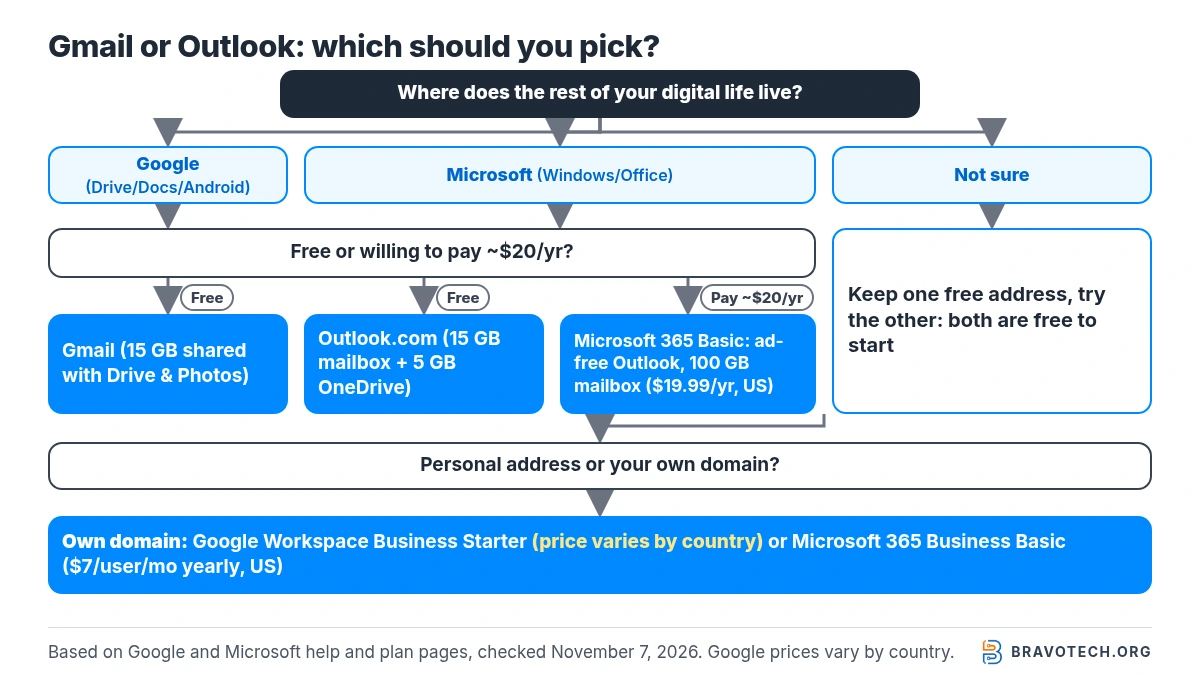
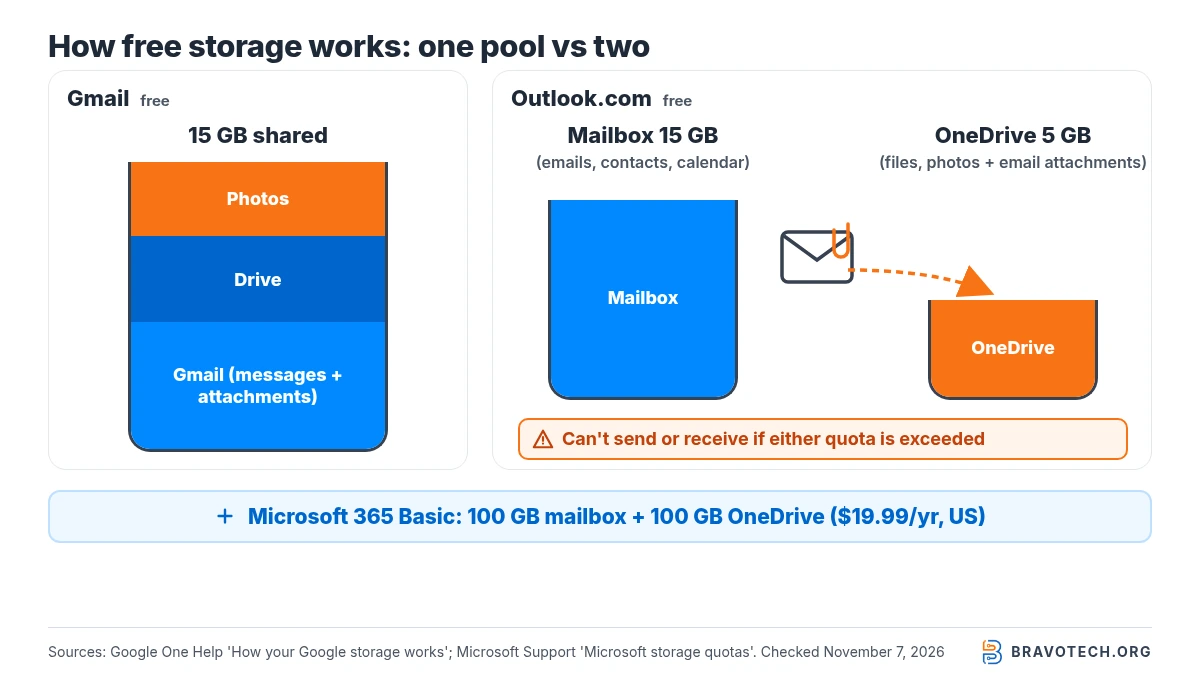
Pick Gmail if you want the most free space for mail alone and you already use Google Drive, Docs or an Android phone. Pick Outlook if you live in Windows and Office, or you’d pay a little for an ad-free inbox with 100 GB of mailbox space. Free Gmail gives 15 GB shared across Gmail, Drive and Photos; free Outlook.com gives 15 GB of mailbox storage plus 5 GB of OneDrive, and attachments count against the OneDrive part. Microsoft 365 Basic is $19.99 a year in the US.
Key takeaways
- Free storage: Gmail 15 GB shared with Drive and Photos; Outlook.com 15 GB mailbox + 5 GB cloud (attachments use the cloud part).
- Cheapest paid step: Microsoft 365 Basic, $19.99/year (US): ad-free Outlook, 100 GB mailbox, 100 GB OneDrive.
- Attachments: both cap a normal attachment at 25 MB; Gmail swaps in a Drive link, Outlook.com shares OneDrive links up to 2 GB.
- Undo send: Gmail lets you pick up to 30 seconds; Outlook.com also delays sending by up to 30 seconds.
- Mixing them: Outlook for Windows adds Gmail accounts officially; Gmail on the web is dropping POP and Gmailify (existing users until January 2027).
What we compared
This is a documentation comparison of the free consumer services (Gmail and Outlook.com) and their cheapest upgrades, with a short look at custom-domain email for small teams. We used Google and Microsoft help, storage and plan pages, opened on November 7, 2026 (PKT), and US list prices where Microsoft shows them. Things we couldn’t confirm from those pages, such as how fast each inbox feels or which filters more spam, we left out on purpose.
Is Gmail or Outlook better for you?
Neither is better for everyone; the right pick follows the rest of your setup. Gmail suits people already using Google Drive, Docs, Photos or Android, because one Google Account ties them together. Outlook suits Windows and Microsoft 365 users, and its cheapest paid plan removes ads and raises mailbox space to 100 GB. Both are free to start, so you can keep one address and test the other.
| If you… | Lean toward | Why (from the vendors’ pages) |
|---|---|---|
| Want one free account for mail, files and photos | Gmail | 15 GB shared across Gmail, Drive and Photos with a Google Account |
| Send a lot of attachments on a free account | Gmail (watch your 15 GB) | Outlook.com counts attachments against its 5 GB OneDrive cloud storage |
| Want an ad-free inbox for the lowest price | Outlook + Microsoft 365 Basic | $19.99/year (US) lists ad-free Outlook and 100 GB of mailbox storage |
| Use Word, Excel and Windows every day | Outlook | Outlook is included free with Windows; Microsoft 365 Personal adds the desktop apps |
| Use Android, Google Calendar and Docs | Gmail | Google’s apps share one account and one storage pool |
| Need a custom-domain address for a small team | Either: compare the business suites | Google Workspace and Microsoft 365 Business both include custom business email |
| Want to read both in one app | Outlook (desktop) or the Gmail mobile app | Outlook for Windows adds Gmail; Gmail web is retiring POP checking |
Bottom line
Default to the ecosystem you already use. On free plans, Gmail’s 15 GB shared pool is simpler, and Outlook.com’s 15 GB mailbox is generous, but its attachments draw on a separate 5 GB cloud allowance. If you’d pay about $20 a year, Microsoft 365 Basic is the clearest documented upgrade for email alone: no ads in Outlook and 100 GB of mailbox space.
Gmail vs Outlook at a glance
| Gmail (free) | Outlook.com (free) | |
|---|---|---|
| Storage | 15 GB shared with Google Drive and Photos | 15 GB mailbox + 5 GB OneDrive cloud storage |
| Do attachments use file storage? | Yes: Gmail messages and attachments count toward the 15 GB | Yes: Microsoft says cloud storage includes your email attachments |
| Attachment limit | 25 MB; larger files become a Google Drive link automatically | 25 MB; OneDrive file links up to 2 GB |
| Undo send | 5, 10, 20 or 30 seconds | Up to 30 seconds (Settings > Mail > Compose) |
| Schedule send | Yes, up to 100 scheduled emails | Yes, documented in Outlook.com and new Outlook |
| Ads | Yes; Google says it doesn’t read your messages to choose ads | Yes on free; Microsoft lists ad-free Outlook with Microsoft 365 Basic |
| Sign-in protection | 2-Step Verification, passkeys | Two-step verification, passkeys, Microsoft Authenticator |
| Cheapest paid upgrade (US) | Google One plans; prices vary by country | Microsoft 365 Basic, $19.99/year |
Which has more free storage, Gmail or Outlook?
On paper Outlook.com gives more (15 GB of mailbox plus 5 GB of OneDrive), but Gmail’s 15 GB is one shared pool. Google counts Gmail messages, attachments, Drive files and Photos together. Microsoft keeps mailbox and cloud quotas separate and says cloud storage includes your email attachments, so attachment-heavy inboxes can fill the 5 GB first (Google One Help, Microsoft Support).
| When you run out… | Gmail / Google Account | Outlook.com |
|---|---|---|
| Sending and receiving “can be impacted” | You can’t send or receive if either the mailbox or the cloud quota is exceeded; incoming mail is returned to the sender | |
| Files | Can’t upload new files to Drive or back up to Photos | OneDrive becomes read-only for new uploads, edits and sync |
| Long-term | Over quota for 2 years or more: content may be removed, with at least 3 months’ notice | Microsoft’s quota page describes further steps after three months over quota |
Running low already? Our guides to Google storage being full and bulk-deleting Gmail cover the cleanup side. If attachments are the problem, saving Gmail attachments to Drive won’t free space on its own, because both live in the same 15 GB. On the Microsoft side, our full-OneDrive guide applies to the 5 GB cloud part.
What do the paid upgrades get you?
Microsoft sells email-focused upgrades; Google mainly sells more shared storage. Microsoft 365 Basic ($19.99 a year in the US) adds ad-free Outlook, advanced Outlook security features, a 100 GB mailbox and 100 GB of OneDrive. Google One plans add space shared across Gmail, Drive and Photos, such as Basic at 100 GB; Google’s prices vary by country (Microsoft, Google One).
| Plan | Price we could verify | Email-relevant extras |
|---|---|---|
| Microsoft 365 Basic | $19.99/year (US) | Ad-free Outlook; 100 GB mailbox; 100 GB OneDrive; advanced Outlook security features (Microsoft’s wording) |
| Microsoft 365 Personal | $99.99/year (US) | 1 TB OneDrive; desktop Outlook, Word, Excel, PowerPoint, OneNote; 100 GB mailbox (all Microsoft 365 subscriptions) |
| Microsoft 365 Family | $129.99/year (US) | 1–6 people; 2 TB shared cloud storage for new subscriptions from Oct 8, 2026; each person keeps a private mailbox |
| Google One Basic | Varies by country (shown in local currency to us) | 100 GB total for Photos, Drive and Gmail; share storage with up to 5 others |
| Google AI Plus / Google AI Pro | Varies by country | 2 TB / 5 TB total storage plus Gemini features, including Gemini in Gmail |
Good to know
Mailbox limit vs cloud storage. Microsoft’s quota page says consumer mailbox storage tops out at 100 GB, even on bigger Microsoft 365 plans. Extra terabytes go to OneDrive. On Google’s side, a bigger Google One plan grows the single pool that Gmail shares with Drive and Photos.
Google One tiers and how they compare with Microsoft’s are tracked in our Google One storage plans guide, and OneDrive vs Google Drive covers the cloud-storage side.
Gmail vs Outlook for small business email
For a [email protected] address, the real choice is Google Workspace versus Microsoft 365 Business, not free Gmail versus Outlook.com. Microsoft 365 Business Basic is $7.00 per user a month, paid yearly in the US, with a 100 GB mailbox and 1 TB of OneDrive. Google Workspace Business Starter includes custom email and 30 GB of pooled storage per user (Microsoft, Google Workspace).
| Entry business plan | Custom email | Storage | Price we could verify | Notes |
|---|---|---|---|---|
| Google Workspace Business Starter | Yes | 30 GB pooled per user | Local currency only from our location; 14-day trial | Starter, Standard and Plus sold for up to 300 users; Workspace lists an ad-free email experience |
| Microsoft 365 Business Basic | Yes | 100 GB mailbox + 50 GB archive; 1 TB OneDrive per user | $7.00/user/month, paid yearly (US) | Web and mobile Outlook, Word, Excel, PowerPoint; Teams; up to 300 users |
This page sticks to email. For the full suites, including Docs vs Word, Meet vs Teams, admin controls and every tier’s price, read our Microsoft 365 vs Google Workspace for small business comparison. Team chat is covered separately in Slack vs Microsoft Teams.
Everyday email features compared
The basics match closely; the details differ. These are the features people ask about most:
| Feature | Gmail | Outlook.com / Outlook |
|---|---|---|
| Undo send | Choose 5, 10, 20 or 30 seconds | Delay up to 30 seconds in Outlook.com |
| Recall a sent email | No recall; use Undo Send | Recall works only between Microsoft 365 work or school accounts in the same organization; not for @outlook.com or @hotmail.com |
| Schedule send | Yes; up to 100 scheduled emails; may send a few minutes late | Yes, in Outlook.com and new Outlook |
| Large files | Over 25 MB becomes a Drive link | Share from OneDrive (links up to 2 GB) |
| Sending limits (personal) | Errors above 500 recipients in one email or 500 emails a day | Microsoft 365 subscribers: 5,000 recipients a day, 500 per message; lower for non-subscribers |
| Expiring / no-forward messages | Confidential mode: expiry date, passcode, forwarding and download disabled | Not compared here (we didn’t verify a consumer equivalent) |
Emails landing in spam folders is mostly about your sending setup, not the provider. Our guide on keeping your emails out of spam applies to both.
Gmail vs Outlook privacy: which shows ads?
Both free services show ads; only Microsoft sells a cheap consumer plan that removes them from email. Google says Gmail ads are based on your online activity while signed in, that Gmail doesn’t scan or read your messages to show ads, and that you can turn off ad personalization. Microsoft lists ad-free Outlook as a feature of Microsoft 365 Basic, its cheapest plan (Gmail Help, Microsoft).
Is Gmail or Outlook more secure?
Both offer the protections that matter most for a personal account: two-step verification and passkeys. Turning those on does more for you than switching providers. Gmail adds confidential mode for expiring messages; Microsoft lists advanced Outlook security features on paid plans. We haven’t audited either service, so we don’t name a winner (Google, Microsoft).
Setting up an authenticator app for either account? See our 2FA app guide. Gmail’s confidential mode also has limits: Google warns that recipients can still take screenshots or photos of the message (Gmail Help).
Is Outlook free to use?
Yes. An Outlook.com account is free, and Microsoft says the Outlook app is free with Windows, free on Android and iPhone, and free for personal use on Mac. The free tier includes 15 GB of mailbox storage, 5 GB of cloud storage and web versions of Word, Excel and PowerPoint. Paying removes ads and raises limits; the desktop Office apps come with Personal or Family (Microsoft).
Can you use Gmail in Outlook, or Outlook in Gmail?
Gmail in Outlook works well and Microsoft documents it; Outlook in Gmail is getting harder. In new Outlook for Windows you add Gmail under Accounts > Your accounts and approve Google’s permission screen. Google says Gmail on a computer can’t add Outlook accounts, and its POP-based Check mail from other accounts and Gmailify are being retired (Microsoft Support, Gmail Help).
Add Gmail to new Outlook for Windows
- In new Outlook, open View > View settings (or File > Account info).
- Go to Accounts > Your accounts and select Add account.
- Enter your Gmail address and select Continue.
- Sign in to Google and select Allow on the permissions screen.
- Select Done when Outlook confirms the account was added.
Changing in 2026–2027
Gmail on the web is winding down POP fetching and Gmailify. Google says that after the first quarter of 2026 the feature stopped accepting new users, and existing users can keep it until January 2027. Mail you already imported stays. To keep reading another provider’s mail in Gmail, Google suggests automatic forwarding from that provider, or adding the account in the Gmail app for Android or iPhone, which uses IMAP (Gmail Help, Gmail Help).
FAQ
Is Gmail or Outlook better for personal use?
For most people it comes down to their other apps. Gmail fits Android and Google Drive users with one shared 15 GB pool. Outlook fits Windows and Office users, and Microsoft 365 Basic ($19.99/year in the US) is a cheap way to get an ad-free inbox with 100 GB of mailbox space.
Should I use Gmail or Outlook on a resume?
Either is fine. What matters is a simple, professional address, such as your name. If you own a domain, a custom address through Google Workspace or Microsoft 365 Business looks more polished than either free service.
Is the Gmail app or the Outlook app better?
Both are free on Android and iPhone. On Windows, new Outlook supports Outlook.com, work or school and Gmail accounts side by side. The Gmail mobile app can add other accounts over IMAP, which is now Google’s suggested route for non-Gmail mail on a phone.
Can I switch from Outlook to Gmail without losing email?
You can keep both addresses and set automatic forwarding from Outlook.com to Gmail, which Google now recommends instead of POP fetching. Old messages stay in the Outlook.com account unless you move them.
Do Gmail and Outlook have the same attachment limit?
Yes, 25 MB for a regular attachment on personal accounts. Gmail turns bigger files into Google Drive links; Outlook.com lets you share OneDrive files of up to 2 GB as links instead.
How this article was made. We drafted this article with the help of AI tools, working from the official pages listed in Sources. Prices, plan limits and steps were checked against those pages on November 7, 2026. Syed Saud Ahsan is the credited author; the BravoTech team prepared it under our editorial standards. We did not test these products hands-on for this article. Spot an error? Email [email protected].
Sources
20 official Google and Microsoft pages, each opened on November 7, 2026 (PKT). Microsoft prices are US list prices; Google pricing pages displayed local currency to us, so Google prices are omitted.
Show all 20 sources
- Google One Help: How your Google storage works
- Google One: Plans and pricing
- Gmail Help: Send attachments with your Gmail message
- Gmail Help: Sending limits / “You have reached a limit for sending mail”
- Gmail Help: Unsend an email (Undo Send)
- Gmail Help: Schedule emails to send
- Gmail Help: Send messages and attachments with confidential mode
- Gmail Help: How Gmail ads work
- Gmail Help: Add another email account on your computer
- Gmail Help: Learn about upcoming changes to Gmailify & POP in Gmail
- Google Account Help: Turn on 2-Step Verification
- Google Workspace: Pricing and plan comparison
- Microsoft: Outlook email and calendar (plans and pricing, US)
- Microsoft Support: Microsoft storage quotas
- Microsoft Support: Sending limits in Outlook.com
- Microsoft Support: Recall or replace an email message that you sent (incl. Undo send in Outlook.com)
- Microsoft Support: Delay or schedule sending email messages in Outlook
- Microsoft Support: Add a Gmail account to Outlook for Windows
- Microsoft Support: How to use two-step verification with your Microsoft account
- Microsoft: Compare all Microsoft 365 business plans (US)
Changelog
- November 9, 2026: First published. Free storage, attachment and sending limits, Microsoft US prices, Workspace/Microsoft 365 entry business plans, and Gmail’s 2026–2027 POP/Gmailify changes checked against Google and Microsoft pages on November 7, 2026.
Related reads