Everything below comes from Microsoft Support pages on OneDrive and Microsoft storage, re-read on November 5, 2026. We haven’t tested these steps on a full account, and Microsoft changed its family storage rules in October 2026, so details may move again. No affiliate links. Read our editorial policy for how we use AI and check facts.
Quick answer
When OneDrive is full, your files become read-only: you can’t upload, edit or sync new ones, but you can still download or delete them. Sign in to OneDrive on the web, look at the largest files, delete what you don’t need and empty the OneDrive Recycle bin online. Outlook.com attachments count too. Microsoft says it freezes accounts left over the limit for three months and might delete them after six.
Key takeaways
- Over quota = read-only. Outlook.com also stops sending and receiving mail.
- The online Recycle bin counts. Emptying your PC’s Recycle bin doesn’t free OneDrive space.
- Email attachments use cloud storage, and you have to delete the email to remove one.
- Deadlines matter: frozen after three months over the limit, possible deletion after six.
- Family and Premium are moving to 2 TB shared (new plans from Oct 8, 2026; renewals from May 2, 2027).
What happens when your OneDrive storage is full?
You can’t upload, edit or sync new files, including camera roll photos, and everything already in OneDrive becomes read-only. Your files are still there, and you can download or delete them. Because Microsoft storage is shared across services, Outlook.com stops sending and receiving email, and Teams won’t send or receive messages with attachments (Microsoft storage quotas).
Microsoft says you’ll get an email when OneDrive is full. The OneDrive icon in the taskbar or menu bar also changes: a yellow warning triangle means nearly full, a red circle with a white minus sign means over the limit (Microsoft Support).
How long before Microsoft freezes or deletes a full OneDrive?
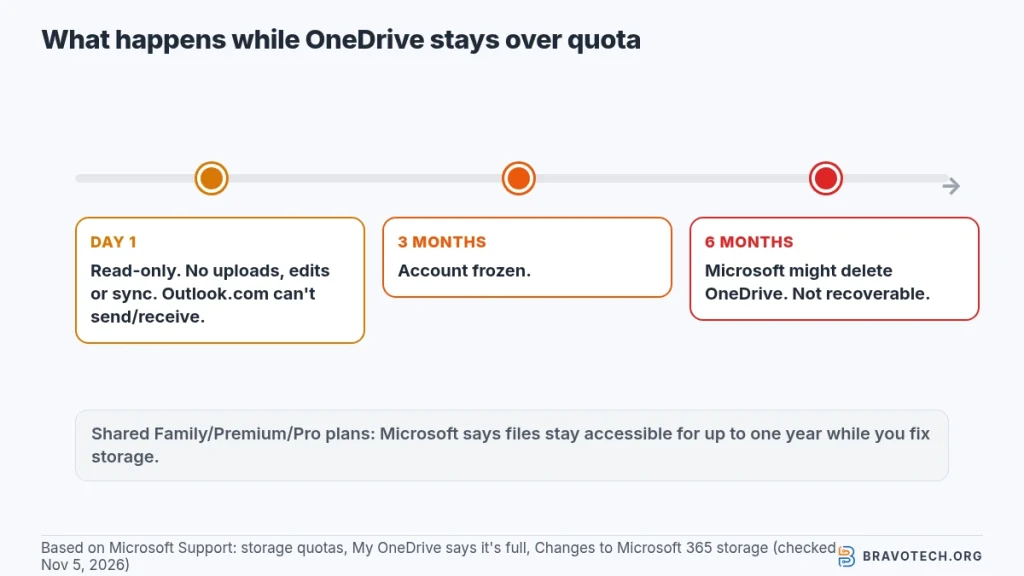
Microsoft says a personal OneDrive left over its limit for three months is frozen, and after six months Microsoft might delete it and every file in it. Deleted files can’t be recovered. Incoming email bounces in the meantime, so senders have to resend once you’re back under quota. Treat the first warning email as the start of the clock, not a reminder to ignore (Microsoft storage quotas, My OneDrive says it’s full).
| Time over the limit | What Microsoft says happens | What you can still do |
|---|---|---|
| Day one | Read-only OneDrive; no new uploads, edits or sync. Outlook.com can’t send or receive. Teams can’t send attachments. | Download, delete, empty the Recycle bin, buy storage |
| Three months | OneDrive account frozen | See Microsoft’s “OneDrive account frozen?” help |
| Six months | Microsoft might delete your OneDrive and all files in it | Nothing; deleted files can’t be recovered |
One exception to watch: Microsoft’s page on the new shared Family, Premium and Pro storage says a subscription that goes over its shared limit can keep accessing files “for up to one year” while it sorts things out (Changes to Microsoft 365 storage). That’s a different rule from the three- and six-month dates above, so if you’re on a shared plan, act early rather than relying on the longer window.
Why does OneDrive say it’s full when I have no files?
Usually because something other than your visible files is using the space: the OneDrive Recycle bin, Outlook.com attachments, a shared folder, or a smaller quota after a subscription or promotion ended. Microsoft lists each of these as a cause. The expired 100 GB Samsung bonus is one example, since that promotion can’t be renewed (My OneDrive says it’s full, What is Microsoft cloud storage?).
- Check the Recycle bin on OneDrive.com. Items there still count.
- Check Outlook.com email storage. Attachments count toward cloud storage.
- Look for a folder someone shared with you that you added to your OneDrive.
- Check your Microsoft account to see whether a subscription expired, a renewal failed or a promotion ended.
What counts toward your Microsoft storage?
Microsoft splits a personal account into cloud storage and mailbox storage. This table sorts the items Microsoft names into each (quotas, OneDrive full, cloud storage).
| Item | Counts toward | How to clear it |
|---|---|---|
| OneDrive files, camera roll photos, screenshots, Desktop/Documents/Pictures backup | Cloud storage | Delete or move out of OneDrive |
| OneDrive Recycle bin | Cloud storage | Empty it on OneDrive.com |
| Outlook.com attachments and pictures | Cloud storage | Delete the email, then empty Deleted Items |
| Loop workspaces, pages and version history | Cloud storage | Delete in Loop, then empty each workspace’s Recycle bin |
| Designer projects and generated images | Cloud storage | Delete in Designer (no recycle bin) |
| Outlook.com emails, contacts, calendar items | Mailbox storage | Settings > Subscription > Email storage |
How do you free up OneDrive storage? A safe-first order
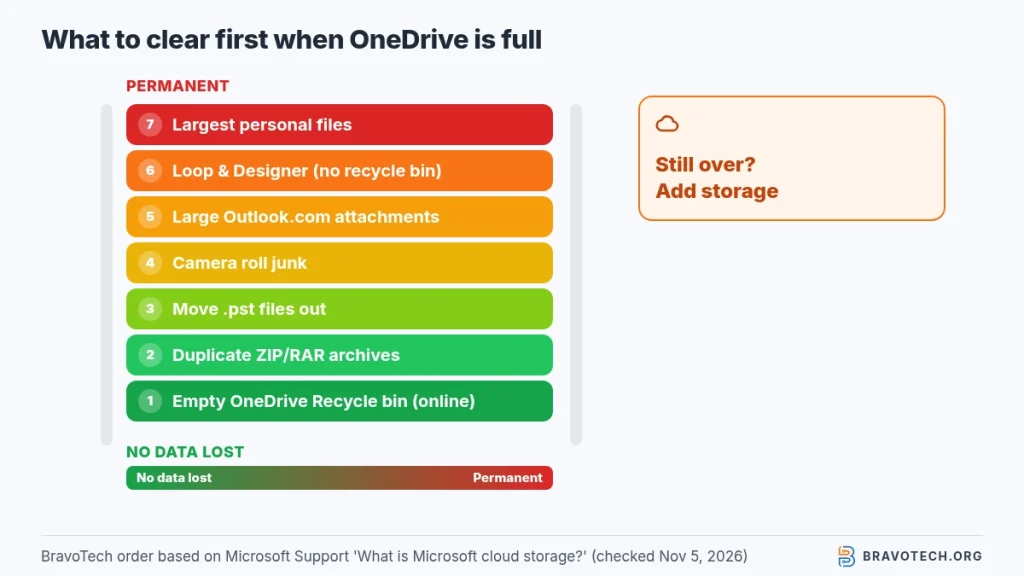
Start with things you won’t miss: empty the OneDrive Recycle bin, remove duplicates and old archives, then clear large Outlook.com attachments. Delete personal files last. Microsoft suggests looking for large files and ZIP archives first, notes that Designer deletions can’t be undone, and says quotas can take up to 24 hours to update after you delete things (What is Microsoft cloud storage?).
The order below is ours, based on Microsoft’s cleanup tips. It runs from no-loss steps to permanent ones.
- Empty the OneDrive Recycle bin online. Your computer’s Recycle bin or Trash is a different thing.
- Delete ZIP, RAR, 7Z or TAR archives if you also keep the unzipped files, or the other way round.
- Move Outlook .pst data files out of OneDrive. Microsoft says they don’t belong there.
- Clear the camera roll of unwanted videos, screenshots and saved social media images.
- Sort Outlook.com Sent Items and other folders by size, delete large emails with attachments, then empty Deleted Items.
- Tidy Loop and Designer. Remember Designer has no recycle bin.
- Review the largest files in OneDrive and delete or move what you’ve saved elsewhere.
- Still over? Buy more storage or upgrade your plan.
Hit the same wall on another service? See Google Drive storage full or iCloud storage full.
Why is OneDrive still full after deleting files?
Deleted files go to the OneDrive Recycle bin, which still counts, and Microsoft says the quota can take up to 24 hours to update. Empty the Recycle bin on OneDrive.com, not just on your computer. If the number still hasn’t moved, Microsoft suggests checking the OneDrive website or Outlook.com Email storage, or refreshing the storage figure in the Outlook mobile app’s account settings (What is Microsoft cloud storage?).
How do you free up OneDrive space without deleting files?
Move files you don’t need in the cloud to a folder outside OneDrive, using File Explorer or Finder. Microsoft warns that files moved out of OneDrive aren’t backed up or protected any more, so keep another copy somewhere safe. Microsoft also suggests keeping Outlook .pst files and reinstallable setup files out of OneDrive altogether (What is Microsoft cloud storage?).
Short on space on your PC rather than in the cloud? That’s a separate problem: our OneDrive Files On-Demand guide covers it, and how to stop OneDrive syncing explains pausing or unlinking folders safely.
How much OneDrive storage do you get?
A free Microsoft account gets 5 GB of cloud storage, Microsoft 365 Basic 100 GB and Personal 1 TB. Family and Premium bought from October 8, 2026 get 2 TB shared by up to six people, and new Pro plans get 5 TB shared. Personal, Family, Premium and Pro can add storage up to 10 TB, and every Microsoft 365 plan includes 100 GB of mailbox storage (Microsoft storage quotas).
| Plan | Cloud storage | People | Notes |
|---|---|---|---|
| Free (no subscription) | 5 GB | 1 | Microsoft says buy Microsoft 365 to get more |
| Microsoft 365 Basic | 100 GB | 1 | Switch to Personal or above to add storage |
| Microsoft 365 Personal | 1 TB | 1 | Can be extended up to 10 TB |
| Family / Premium (started before Oct 8, 2026) | 1 TB per person | Up to 6 | Moves to 2 TB shared on renewal from May 2, 2027 |
| Family / Premium (new from Oct 8, 2026) | 2 TB shared | Up to 6 | Can be extended up to 10 TB |
| Pro (started before Oct 8, 2026) | 1 TB per person | Up to 6 | Moves to 5 TB shared on Nov 1, 2027 |
| Pro (new from Oct 8, 2026) | 5 TB shared | Up to 6 | Can be extended up to 10 TB |
After buying storage, Microsoft says the new quota can take up to 24 hours to appear; contact support if it hasn’t after 48 hours (Microsoft Support). New to the service? Start with what OneDrive is, or browse our cloud storage guides.
How does shared family storage work when it’s full?
On the new shared model, everyone on a Family, Premium or Pro plan draws from one pool, so one member’s files can fill it for all six. Files stay private: you see your own breakdown and only a total for other members. Storage add-ons bought by any member go into the pool, and Microsoft sends notices as the plan nears its limit (Changes to Microsoft 365 storage).
Microsoft’s OneDrive-full page also lists “you or someone you’ve shared your subscription with” as a reason the account is full, and says only the subscription holder can add storage to a shared plan (My OneDrive says it’s full, quotas).
What if my work or school OneDrive is full?
Microsoft’s advice is to delete files or ask your IT admin about a bigger quota. Microsoft says a work or school OneDrive can be full because you hit your own quota or your organisation hit its pooled limit. In OneDrive on the web, select Storage used in the lower-left corner, review the largest files, and empty the recycle bin (My OneDrive says it’s full).
FAQ
Can I still delete files when OneDrive is full?
Yes. Microsoft says files are read-only while you’re over quota, but you can still download or delete them. That’s how you get back under the limit.
Is the free OneDrive plan 5 GB?
Yes. Microsoft lists 5 GB of cloud storage for a Microsoft account with no subscription, and that space is shared with Outlook.com attachments.
Will my OneDrive be deleted if I cancel Microsoft 365?
Not straight away. Your quota drops, and if your files then exceed it, the over-limit rules apply: read-only first, frozen after three months, possible deletion after six.
Why does my OneDrive say it’s full after my Samsung storage ended?
Microsoft says the 100 GB Samsung bonus was a limited-time promotion that can’t be renewed. When it ended, your quota shrank, so files that fit before may now put you over.
How this article was made. We drafted this article with the help of AI tools, working from the official pages listed in Sources. Plan limits and steps were checked against those pages on November 5, 2026. Syed Saud Ahsan is the credited author; the BravoTech team prepared it under our editorial standards. We did not test these products hands-on for this article. Spot an error? Email [email protected].
Sources
4 official Microsoft Support pages, each opened on November 5, 2026 (PKT).
Changelog
- November 7, 2026: First published. Over-quota rules, what counts toward storage, a cleanup order and the new shared-storage quotas, checked against Microsoft Support on November 5, 2026.
Related reads