The prices below are Microsoft’s US list prices, read from the Microsoft Store on November 9, 2026; your country’s store may charge a different amount or currency, so check it at checkout. Storage rules come from Microsoft Support, which changed Family storage in October 2026. We didn’t buy or share a subscription for this piece. No affiliate links; see our editorial policy.
Quick answer
Buy Microsoft 365 Personal if you’re the only person who will use it. Buy Family as soon as a second person would otherwise need their own copy. In the US, Personal is $99.99 a year for one person and 1 TB; Family is $129.99 a year for up to six people and 2 TB of storage they share (for subscriptions started from October 8, 2026). Two Personal plans cost $199.98, so Family saves about $70 a year from the second person onward.
Key takeaways
- Price (US, yearly): Personal $99.99, Family $129.99. Monthly billing is $9.99 and $12.99.
- People: Personal is for 1 person; Family covers 1 to 6, each with their own Microsoft account and up to 5 signed-in devices.
- Storage changed: new Family plans get 2 TB shared by everyone; Family plans started before October 8, 2026 keep 1 TB per person until their first renewal on or after May 2, 2027.
- Copilot: on Family, AI features are for the subscription owner only; members get the apps and storage.
- Privacy: sharing the plan doesn’t share files. Each person’s mailbox, files and folders stay private.
In this guide
- Which plan should you buy?
- Personal vs Family at a glance
- Price
- Is Family worth it? Per-person math
- Storage after the October 2026 change
- People and devices
- Can members see your files?
- Copilot and AI features
- Family vs Premium and Basic
- How to share Family
- Upgrade from Personal to Family
- If the owner stops sharing
- FAQ
- Sources
What we compared
This compares Microsoft’s two main home plans as Microsoft documents them: what each costs in the US store, who can use it, how storage is split, and what members do and don’t get. All figures were read on November 9, 2026 (PKT) from the Microsoft Store and Microsoft Support pages listed at the end. The cost-per-person table is our own arithmetic on those list prices, not a Microsoft figure, and ignores sales, bundles and employer discounts.
Should I get Microsoft 365 Personal or Family?
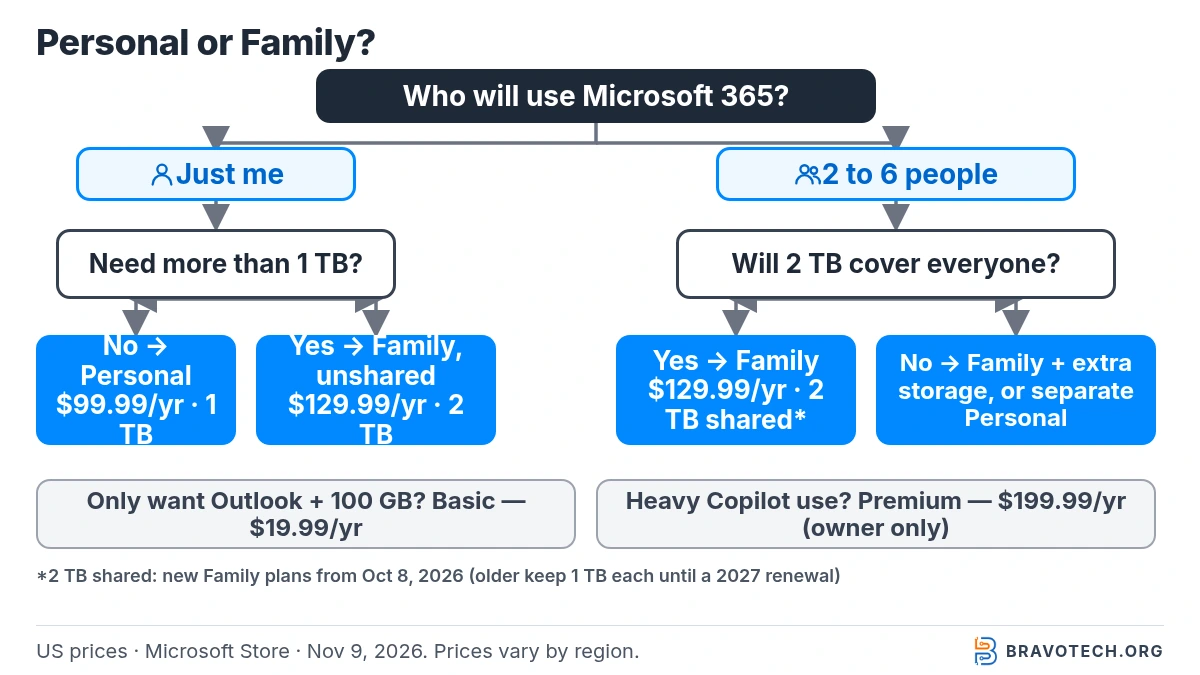
Pick by headcount first, then by storage. If you’re the only user and 1 TB is plenty, Personal is the cheaper plan. If two or more people in your home need Word, Excel and Outlook, Family is cheaper than separate Personal plans. One twist after Microsoft’s October 2026 change: a single person who needs more than 1 TB gets 2 TB on Family for $30 more a year.
| Your situation | Better fit | Why (from Microsoft’s pages) |
|---|---|---|
| Just you, under 1 TB of files | Personal | $99.99/year for 1 person and 1 TB that belongs to you alone |
| You and a partner, both need the desktop apps | Family | $129.99/year covers both; two Personal plans would be $199.98 |
| Three to six people in one home | Family | Up to 6 people, each with 5 signed-in devices; cost per person falls to $43.33 or less |
| Just you, but over 1 TB of photos and files | Family (unshared) | New Family plans include 2 TB shared storage; if you don’t share, you can use all of it |
| Several people with large photo libraries | Family, but check the 2 TB pool | New Family storage is one 2 TB pool for everyone, not 1 TB each |
| You want the most Copilot use | Premium | $199.99/year; “extensive” AI usage, still for the owner only |
| You only want ad-free Outlook and 100 GB | Basic | $19.99/year; no desktop apps or AI features |
Bottom line
Family is the better buy for any household with two or more users: it costs $30 a year more than one Personal plan but replaces up to five more. Personal is still right for one person who fits in 1 TB. The catch to check before buying Family for a big household is storage: on new subscriptions, everyone now draws from a single 2 TB pool.
Microsoft 365 Personal vs Family at a glance
| Microsoft 365 Personal | Microsoft 365 Family | |
|---|---|---|
| US price, yearly | $99.99 | $129.99 |
| US price, monthly | $9.99 | $12.99 |
| People | 1 | 1 to 6 (owner plus up to five others) |
| Devices | Sign in on 5 devices at once | Each person on up to 5 devices at once |
| OneDrive storage (new subscriptions) | 1 TB, for you only | 2 TB shared by everyone on the plan |
| OneDrive storage (Family started before Oct 8, 2026) | Not applicable | 1 TB per person until the first renewal on or after May 2, 2027 |
| Outlook mailbox | 100 GB | 100 GB (Microsoft says all Microsoft 365 subscriptions include 100 GB of mailbox storage) |
| Desktop apps | Word, Excel, PowerPoint, Outlook, OneNote; Access on PC | Same, for every member |
| Copilot / AI features | Included (higher usage than free) | Included for the subscription owner only |
| Microsoft Defender, Teams calling | Included | Included |
| Can be shared | No | Yes, with up to five people in your Microsoft family group |
How much do Microsoft 365 Personal and Family cost?
In the US store, Personal costs $99.99 a year or $9.99 a month, and Family costs $129.99 a year or $12.99 a month. Paying yearly is cheaper: twelve monthly payments add up to $119.88 for Personal and $155.88 for Family. Microsoft says subscriptions renew automatically at the regular price unless you cancel, and features can vary by region (Microsoft Store).
| Plan | Yearly (US) | Monthly (US) | 12 months paid monthly | Yearly saves |
|---|---|---|---|---|
| Microsoft 365 Basic | $19.99 | $1.99 | $23.88 | $3.89 |
| Microsoft 365 Personal | $99.99 | $9.99 | $119.88 | $19.89 |
| Microsoft 365 Family | $129.99 | $12.99 | $155.88 | $25.89 |
| Microsoft 365 Premium | $199.99 | $19.99 | $239.88 | $39.89 |
Searching for the price in your own country? Microsoft’s store localizes prices and currency, and we only checked the US store, so we don’t quote other countries’ prices here. Whatever your local numbers are, the per-person method in the next section works the same way.
Is Microsoft 365 Family worth it over Personal?
Yes, from the second user onward. At US prices, Family costs $129.99 a year whatever the headcount, so the cost per person falls from $65.00 with two people to $21.67 with six. Buying Personal for each person instead would cost $199.98 for two and $599.94 for six. For one person, Family costs $30 more than Personal, which buys 2 TB of storage instead of 1 TB on a new subscription.
| People using it | Family cost per person / year | Same people on separate Personal plans | Family saves per year | New-Family storage per person, if split evenly |
|---|---|---|---|---|
| 1 | $129.99 | $99.99 | −$30.00 (Personal is cheaper) | 2 TB (all of the pool) |
| 2 | $65.00 | $199.98 | $69.99 | 1 TB |
| 3 | $43.33 | $299.97 | $169.98 | About 0.67 TB |
| 4 | $32.50 | $399.96 | $269.97 | 0.5 TB |
| 5 | $26.00 | $499.95 | $369.96 | 0.4 TB |
| 6 | $21.67 | $599.94 | $469.95 | About 0.33 TB |
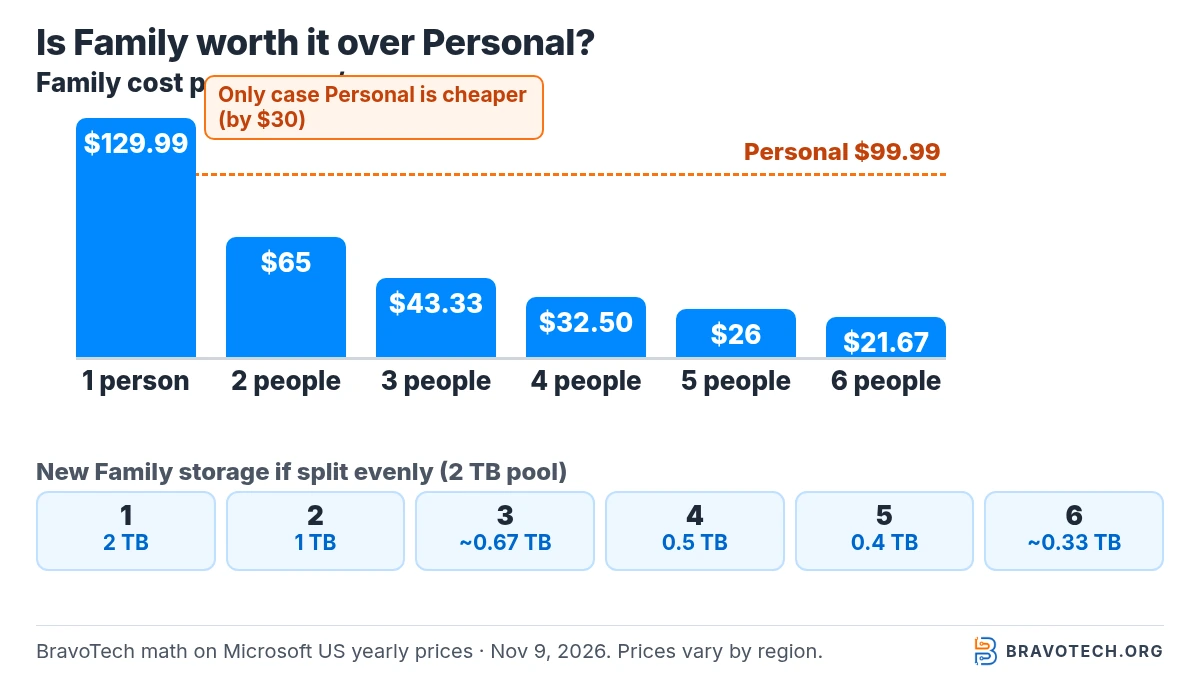
Reading the table: money and storage pull in opposite directions. The more people share Family, the cheaper it gets per head, but on a new subscription the same 2 TB has to cover everyone. Two people get the same 1 TB each on average as two Personal plans, for $69.99 less. From three people up, the household has less total storage than separate Personal plans would give, so add up how much OneDrive space everyone actually uses before you decide. Our OneDrive storage full guide shows how to check that.
How much storage does Microsoft 365 Family get now?
New Family subscriptions, including expired ones bought again, get 2 TB of OneDrive storage shared by everyone on the plan, starting October 8, 2026. Family plans that started earlier keep 1 TB per person until their first renewal on or after May 2, 2027, when they move to the shared 2 TB. Personal stays at 1 TB, dedicated to the account holder (Microsoft Support).
| Plan | Cloud storage | Who uses it |
|---|---|---|
| Free Microsoft account | 5 GB | 1 person |
| Microsoft 365 Basic | 100 GB | Account holder only |
| Microsoft 365 Personal | 1 TB | Account holder only |
| Microsoft 365 Family, started before October 8, 2026 | 1 TB per person | Up to 6 people, until the first renewal on or after May 2, 2027 |
| Microsoft 365 Family, new from October 8, 2026 (and older plans after that renewal) | 2 TB shared | Owner and up to five others, from one pool |
Microsoft adds a few details on its storage-change page: storage add-ons bought by members go into the shared pool, existing subscribers in some markets may get transitional bonus storage at renewal, and upgrading an existing Family plan to Premium before May 2, 2027 moves it to shared storage early (Changes to Microsoft 365 storage). Microsoft also says Personal and Family storage can be extended up to 10 TB (Microsoft storage quotas); we didn’t check add-on prices for this article.
Over the 2 TB pool?
Microsoft says that if a shared plan goes over its 2 TB limit, you don’t lose access straight away: you get notifications as you approach it, and you can keep accessing files for up to one year while you free up space, buy more or upgrade. Before your plan moves to shared storage, Microsoft says you’ll need to ask other members how much they use, because the per-member breakdown only appears after the switch. Our OneDrive storage full guide walks through clearing space.
How many people and devices can use Microsoft 365 Family?
Up to six people: the subscription owner plus up to five others in the owner’s Microsoft family group. Each person uses their own Microsoft account and can be signed in on up to five devices at once, across Windows PCs, Macs, phones and tablets. Personal works the same way for devices, but only for one person (Microsoft Store).
Because each member signs in with their own account, two people can share one family computer: each signs in to Windows and Microsoft 365 with their own Microsoft account. Microsoft describes Family as a way to extend benefits “to multiple people in a household,” and sharing works only with people who join your family group.
Can people on my Microsoft 365 Family plan see my files?
No. Microsoft says each person’s personal files, emails, contacts, photos and notebooks stay private and are stored separately. Shared storage only pools the quota; members can’t open each other’s OneDrive files unless someone shares them. Joining the family group doesn’t hand your data to the owner, though members do get a shared Family inbox, calendar and OneNote (Microsoft Support).
After a plan moves to shared storage, Microsoft says you’ll see a detailed breakdown of your own usage, but only a total for other members, not their files (Microsoft Support). Family group membership can also include Microsoft Family Safety features; Microsoft says activity data such as browsing or screen time is shared only if you choose to.
Do Microsoft 365 Family members get Copilot?
No. On Family, Copilot and the other AI features are available only to the subscription owner and can’t be shared with members. Members still get the desktop apps, storage, Microsoft Defender and the other non-AI benefits. If several people in your home want Copilot inside Word or Excel, each would need their own plan with AI, because Premium’s AI is also owner-only (Microsoft Store).
Microsoft lists usage on both Personal and Family as “higher than free” and on Premium as “extensive,” and it notes that usage limits apply. For Copilot in Excel, the file has to be saved to OneDrive with AutoSave on.
Microsoft 365 Family vs Premium, and where Basic fits
Premium is Family plus much heavier AI use for the owner; Basic is a storage-and-Outlook plan without the desktop apps. How the four home plans line up in Microsoft’s US store:
| Basic | Personal | Family | Premium | |
|---|---|---|---|---|
| US price / year | $19.99 | $99.99 | $129.99 | $199.99 |
| People | 1 | 1 | 1 to 6 | 1 to 6 |
| Cloud storage (new subscriptions) | 100 GB | 1 TB | 2 TB shared | 2 TB shared |
| Desktop Word, Excel, PowerPoint | No (web and mobile only) | Yes | Yes | Yes |
| AI features | Not included | Higher than free | Higher than free, owner only | Extensive, owner only, plus agent features |
For most households the choice is Family vs Personal; Premium only makes sense if the owner uses Copilot heavily enough to justify $70 a year more than Family. If you’re weighing Microsoft against Google’s apps for a small team rather than a household, see Microsoft 365 vs Google Workspace.
How do I share Microsoft 365 Family?
Only the owner of a Family (or Premium or Pro) plan can share it, and only by invitation: product keys can’t be used for sharing. Microsoft’s steps:
- Go to account.microsoft.com/services/office/sharing and sign in with the account that owns the subscription.
- Choose to invite someone by email, or copy a sharing link to send in a text or message.
- The person opens the invitation and accepts it to join your family group. If they don’t have a Microsoft account, they’re asked to create one.
- They need to accept within 48 hours; until then you’ll see “Pending invite” on your dashboard.
- Once they’ve joined, they can install Microsoft 365 on their own devices and use their OneDrive storage.
Someone already in another Microsoft family group has to leave it before they can join yours (Microsoft Support). If you’re using a plan that someone else shared with you, you can’t re-share it.
How do I upgrade from Microsoft 365 Personal to Family?
Buy Microsoft 365 Family with the same Microsoft account that holds your Personal subscription. Microsoft says you can start using the new plan straight away, and the remaining time on Personal is converted and added to Family. Because the plans cost different amounts, the days added can be fewer than the days you had left. You don’t need to reinstall the apps (Microsoft Support).
Bought Personal through Apple, Google or a retailer? Microsoft says you have to manage or switch the subscription through that provider. Going the other way, from Family down to Personal, means cancelling Family and buying Personal; you keep Family until it expires, and the change applies at renewal.
What happens if the Family owner stops sharing or cancels?
Members keep their files, but they lose the subscription benefits. Microsoft says they can still view and print Office files but can’t edit them or create new ones, their OneDrive storage drops back to 5 GB, and they lose the Family inbox and calendar if they leave the family group. The same applies to everyone if the owner lets the subscription expire (Microsoft Support).
Before a member is removed, it’s worth checking how much they keep in OneDrive: once storage drops to 5 GB, Microsoft says you can’t send or receive Outlook.com email while you’re over your cloud storage or mailbox quota, so move or delete files first. Our explainer on what OneDrive is covers how its storage works.
FAQ
Can I share Microsoft 365 Family with friends who don’t live with me?
Microsoft’s pages say sharing works with people who join your Microsoft family group, and its store describes Family as extending benefits to people in a household. The sharing pages we read don’t list an address check, so read Microsoft’s terms for your country if you’re unsure.
Is Microsoft 365 Family the same as Microsoft 365 Home?
We couldn’t find a current Microsoft 365 Home plan on Microsoft’s US store; the home plans listed today are Basic, Personal, Family and Premium. If you’re renewing an older Home subscription, check what your Microsoft account page shows.
Does each Family member get their own 1 TB?
Only on Family plans started before October 8, 2026, and only until their first renewal on or after May 2, 2027. New Family subscriptions get one 2 TB pool shared by everyone.
Do Family members need their own Microsoft account?
Yes. Each person accepts the invitation with their own Microsoft account, or creates one, and joins your family group. That’s how files and mail stay separate.
Is Microsoft 365 Personal or Family cheaper per month?
Personal is cheaper overall ($9.99 vs $12.99 a month in the US), but Family is cheaper per person as soon as two people use it. Yearly billing costs less than paying monthly for either plan.
How this article was made. We drafted this article with the help of AI tools, working from the official pages listed in Sources. Prices, plan limits and steps were checked against those pages on November 9, 2026. Syed Saud Ahsan is the credited author; the BravoTech team prepared it under our editorial standards. We did not test these products hands-on for this article. Spot an error? Email [email protected].
Sources
9 official Microsoft pages, each opened on November 9, 2026 (PKT). Prices are US list prices from Microsoft’s own pages; other regions differ. Microsoft’s Basic user-guide page still shows the older “1 TB per person” Family storage in its plan table, so storage figures come from Microsoft Support’s storage pages instead.
Show all 9 sources
- Microsoft Store (US): Compare all Microsoft 365 plans (prices, users, storage, Copilot)
- Microsoft: Microsoft 365 for Individuals user guide (Microsoft 365 Basic US price)
- Microsoft Support: Microsoft 365 Personal, Family, Premium, and Pro subscription benefits
- Microsoft Support: Microsoft storage quotas
- Microsoft Support: Changes to Microsoft 365 storage (shared storage)
- Microsoft Support: Share your Microsoft 365 subscription
- Microsoft Support: Microsoft 365 subscription sharing FAQs
- Microsoft Support: Stop sharing a Microsoft 365 subscription
- Microsoft Support: Switch between Microsoft 365 subscriptions
Changelog
- November 11, 2026: First published. US prices, people and device limits, the October 2026 shared-storage change, sharing and upgrade steps, checked against Microsoft’s pages on November 9, 2026.
Related reads