Reviewed by Syed Saud Ahsan, Editor · November 12, 2026
Prices are Apple’s US prices in US dollars as listed on Apple’s own pages on November 11, 2026; Apple notes that some US states add tax, and other countries pay different amounts. Yearly, per-TB and per-person figures are our arithmetic and are labelled. We didn’t buy a plan for this article, there are no affiliate links, and nothing here is a recommendation. How we work: editorial policy.
Quick answer
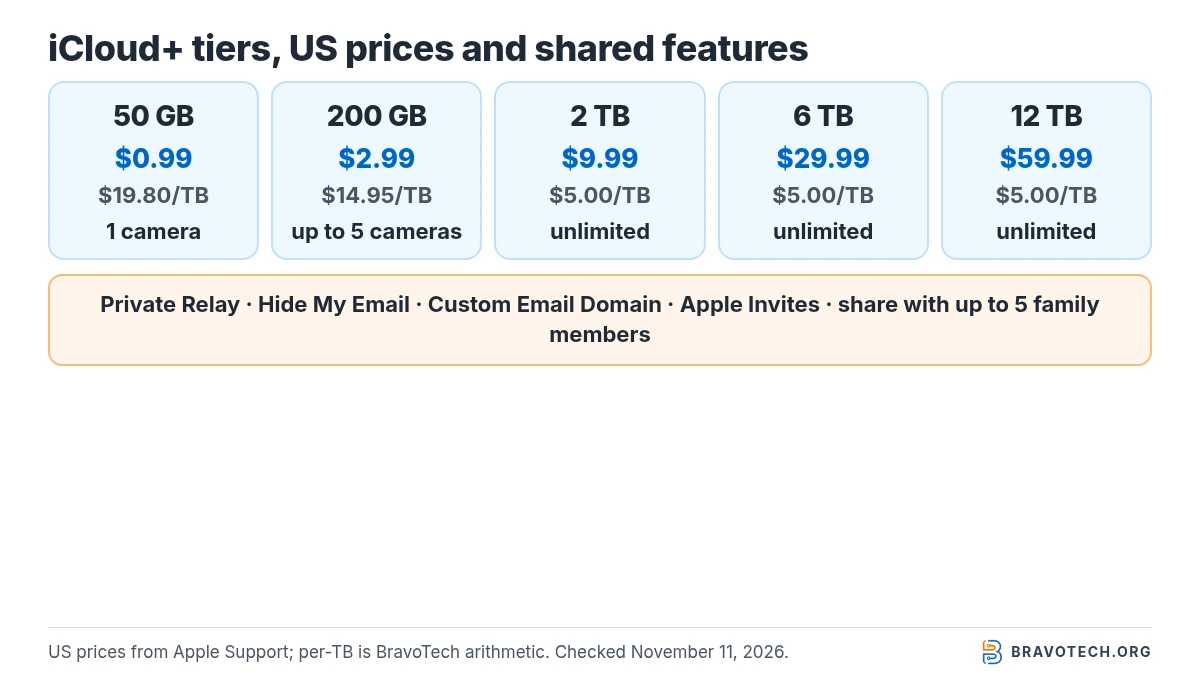
iCloud+ comes in five US tiers: 50 GB for $0.99, 200 GB for $2.99, 2 TB for $9.99, 6 TB for $29.99 and 12 TB for $59.99 a month. Every tier includes Private Relay, Hide My Email, Custom Email Domain and Apple Invites, and can be shared with up to five other family members. The tiers differ in storage and in how many HomeKit Secure Video cameras they support.
Key takeaways
- Free iCloud is 5 GB. iCloud+ replaces it with 50 GB to 12 TB, billed monthly.
- The features are the same on every tier except HomeKit Secure Video: one camera on 50 GB, up to five on 200 GB, unlimited from 2 TB.
- From 2 TB up, the price is $5 per TB a month (our arithmetic: $9.99 ÷ 2, $29.99 ÷ 6, $59.99 ÷ 12).
- Apple One includes 50 GB, 200 GB or 2 TB depending on the bundle; with an iCloud+ plan on top, Apple says total iCloud storage can reach 14 TB.
- Downgrades and cancellations take effect when the billing period ends, and over-capacity accounts stop syncing and backing up.
How much does iCloud+ cost in the US?
Apple lists five US iCloud+ tiers, all billed monthly: 50 GB at $0.99, 200 GB at $2.99, 2 TB at $9.99, 6 TB at $29.99 and 12 TB at $59.99. Apple’s support page, published September 16, 2026, adds that residents of some US states pay tax on top. Prices outside the US are listed separately on the same page and often differ.
| iCloud+ tier | US price per month | Billing | Source |
|---|---|---|---|
| 50 GB | $0.99 | Monthly | Apple Support |
| 200 GB | $2.99 | Monthly | Apple Support |
| 2 TB | $9.99 | Monthly | Apple Support |
| 6 TB | $29.99 | Monthly | Apple Support |
| 12 TB | $59.99 | Monthly | Apple Support |
What does iCloud+ cost per year and per TB?
Twelve monthly payments come to $11.88 for 50 GB, $35.88 for 200 GB and $119.88 for 2 TB, before any tax. Apple bills iCloud+ monthly, so these are totals, not annual plan prices. Per TB, the small tiers cost the most: about $19.80 a month on 50 GB and $14.95 on 200 GB, falling to $5.00 a month from 2 TB upward.
| Tier | 12 months of payments | Per TB per month | Per person per month if 6 share (our math) |
|---|---|---|---|
| 50 GB | $11.88 | $19.80 | $0.17 |
| 200 GB | $35.88 | $14.95 | $0.50 |
| 2 TB | $119.88 | $5.00 | $1.67 |
| 6 TB | $359.88 | $5.00 | $5.00 |
| 12 TB | $719.88 | $5.00 | $10.00 |
For the same figures across Google, Microsoft, Dropbox and others, see our US cloud storage price tracker. Google’s plans are covered in Google One storage plans explained.
Which features come with each iCloud+ tier?
Apart from storage, only one feature changes between tiers: HomeKit Secure Video. Apple’s list puts iCloud Private Relay, Hide My Email, Custom Email Domain, Apple Invites and sharing with up to five other family members on every tier. HomeKit Secure Video recording covers one camera on 50 GB, up to five on 200 GB, and an unlimited number on 2 TB, 6 TB and 12 TB.
| Feature | Free 5 GB | 50 GB | 200 GB | 2 TB / 6 TB / 12 TB |
|---|---|---|---|---|
| iCloud storage | 5 GB | 50 GB | 200 GB | 2 TB, 6 TB or 12 TB |
| iCloud Private Relay | — | Included | Included | Included |
| Hide My Email | — | Included | Included | Included |
| Custom Email Domain | — | Included | Included | Included |
| Apple Invites (creating invitations) | — | Included | Included | Included |
| HomeKit Secure Video cameras | — | 1 | Up to 5 | Unlimited |
| Share with family members | — | Up to 5 others | Up to 5 others | Up to 5 others |
What’s the difference between free iCloud and iCloud+?
Free iCloud gives every Apple Account 5 GB; iCloud+ is the paid subscription that adds storage and the privacy features. The 5 GB has to hold iCloud backups, iCloud Photos, iCloud Drive files, mail and app data together. This is separate from your iPhone’s own storage: freeing space on the phone doesn’t free space in iCloud, and the reverse is also true.
If the warning you’re seeing is about the phone rather than iCloud, see iPhone storage full; if it’s iCloud, iCloud storage full covers what to clear before paying. Apple explains the difference on its iCloud vs device storage page.
Where do you buy or upgrade iCloud+?
On an iPhone you buy or change iCloud+ in the Settings app, starting from your name at the top, but the exact menu depends on the iOS version. Apple’s support page lists four different routes for iPhone alone, for iOS 17 and earlier, iOS 18 to 18.3, iOS 18.4 to iOS 26, and iOS 27 and later. Plans can also be bought from a Mac, iPad, Vision Pro or Windows PC.
| iOS version | Where the plan option sits (upgrading an existing plan) |
|---|---|
| iOS 27 and later | Settings → your name → iCloud → Manage Plan (under iCloud+ Features) |
| iOS 18.4 to iOS 26 | Settings → your name → Subscriptions → iCloud+ → See All Plans |
| iOS 18 to 18.3 | Settings → your name → iCloud → Manage Plan |
| iOS 17 and earlier | Settings → your name → iCloud → Manage Account Storage → Change Storage Plan |
How does iCloud+ family sharing work?
One person’s iCloud+ plan can be shared with up to five other members of their Family Sharing group, and everyone draws from the same storage. Each person keeps their own Apple Account, so photos and documents stay private. When the group runs low, every member is notified, and the organiser or the person who bought the plan can increase it, up to 12 TB.
- One group at a time. Apple says you can belong to one Family Sharing group and switch groups only once a year (Family Sharing).
- Members with their own plan can keep it or switch to the shared one; Apple says switching refunds the remaining part of their own plan (Apple Support).
- Setting the group up first is a separate step; our guide to setting up iCloud Family Sharing covers it.
Shared 2 TB worked through: $9.99 a month across six people is about $1.67 each, but all six share the same 2 TB rather than getting 2 TB each.
How does iCloud+ work inside Apple One?
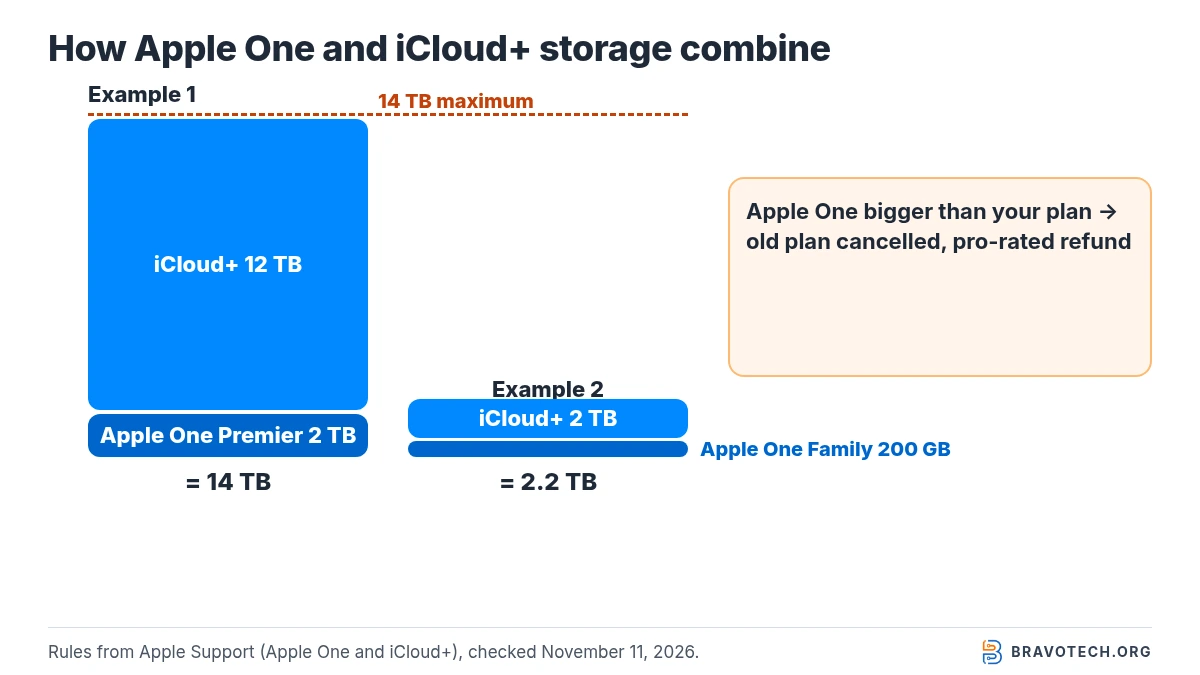
Each Apple One bundle includes an iCloud+ tier: 50 GB with Individual ($21.95 a month), 200 GB with Family ($27.95) and 2 TB with Premier ($39.95). If you already pay for iCloud+, what happens depends on sizes. A bigger Apple One allowance cancels your old plan with a pro-rated refund; a smaller one lets you keep both, which is how total iCloud storage can reach 14 TB.
| Apple One plan (US) | Price per month | iCloud+ storage included | Other services Apple lists |
|---|---|---|---|
| Individual | $21.95 | 50 GB | Apple TV, Apple Music, Apple Arcade |
| Family | $27.95 | 200 GB | Apple TV, Apple Music, Apple Arcade; share with up to five others |
| Premier | $39.95 | 2 TB | All six Apple subscriptions, including Apple Fitness+ and Apple News+ |
| Starting point (illustrative) | Apple One storage vs your plan | What Apple says happens | Resulting iCloud storage |
|---|---|---|---|
| iCloud+ 50 GB, join Apple One Family | Larger (200 GB) | Old plan cancelled, pro-rated refund | 200 GB |
| iCloud+ 50 GB, join Apple One Individual | Equal (50 GB) | Both kept during the free trial; old plan cancelled after it | 50 GB |
| iCloud+ 2 TB, join Apple One Family | Smaller (200 GB) | Both kept | 2.2 TB, paying $27.95 + $9.99 |
| iCloud+ 12 TB, join Apple One Premier | Smaller (2 TB) | Both kept | 14 TB, Apple’s stated maximum |
What happens if you downgrade or cancel iCloud+?
The change waits until the current billing period ends; after that, iCloud stops syncing if what you store is over the new limit. Apple says iCloud won’t update your information and iCloud backups won’t complete until you free space or buy more. Cancelling also removes Hide My Email, Private Relay, Apple Invites and HomeKit Secure Video support.
Before you downgrade
Apple says partial refunds are available where the law requires them, and that if you recently changed your plan you should contact Apple within 14 days (Apple Support). Before downgrading, download or remove whatever won’t fit, especially iCloud Photos and old device backups.
If you’d rather keep a full copy of your iPhone outside iCloud, backing up an iPhone to a Windows PC or Mac uses your computer’s disk instead of iCloud storage.
Can you get extra iCloud storage when buying a new iPhone?
Yes. Apple gives temporary iCloud storage for a one-off backup when you buy a new iPhone or iPad and don’t have enough space. You have 21 days to restore it to the new device, and if the device hasn’t arrived you can ask for another 21 days. The temporary backup is deleted after that, so don’t erase the old phone until the restore is done.
Apple’s page on temporary iCloud storage covers eligibility. For moving data straight from phone to phone without iCloud, see how to transfer data from iPhone to iPhone.
FAQ
Is iCloud+ the same as iCloud storage?
iCloud+ is the paid subscription; iCloud storage is the space it gives you. Free iCloud also has storage (5 GB) but none of the iCloud+ features such as Hide My Email or Private Relay.
Is there a yearly iCloud+ plan in the US?
Apple’s US price list shows monthly billing only. Twelve months of the 2 TB tier comes to $119.88 before tax, by our arithmetic.
What’s the largest iCloud storage you can have?
12 TB from iCloud+ alone. Apple says that combining Apple One with an iCloud+ plan can bring the total to 14 TB.
Do family members see each other’s photos on a shared plan?
No. Apple says everyone uses their own Apple Account, so photos and documents stay private while the storage is shared.
Does iCloud+ cost the same in every country?
No. Apple’s page lists prices by country and currency, and some countries’ rows differ from the US. Check the row for your own country before comparing.
How this article was made. We drafted this article with the help of AI tools, working from the official pages listed in Sources. Prices, plan limits and steps were checked against those pages on November 11, 2026. Fawad Malik is the credited author; the BravoTech team prepared it under our editorial standards. We did not test these products hands-on for this article. Spot an error? Email [email protected].
Sources
9 Apple pages, each opened on November 11, 2026 (PKT); prices are the United States row.
Show all 9 sources
- Apple Support: iCloud+ plans and pricing (features by tier; United States prices; published September 16, 2026)
- Apple Support: Buy iCloud+ or upgrade your current storage plan
- Apple Support: Share iCloud+ with your Family Sharing group
- Apple Support: Downgrade or cancel your iCloud+ plan (September 15, 2026)
- Apple: Apple One plans and US prices
- Apple Support: If you have an iCloud+ plan and subscribe to Apple One (January 14, 2026)
- Apple Support: Get temporary iCloud storage when you buy a new iPhone or iPad
- Apple Support: iCloud storage vs device storage on iPhone or iPad
- Apple Support: What is Family Sharing? (November 9, 2026)
Changelog
- November 12, 2026: First published. US prices and plan rules checked on November 11, 2026.
Related reads